At the end of Kevin's getting-started article, your site is running on Cloudflare and your first post is published. Before you send the address to friends, clients or the wider world, one question usually comes up: am I allowed to put this online as it is, or is something missing?
In Germany and Switzerland, two pages are almost always missing: the legal notice, which Germans call the Impressum, and the privacy policy. In this article I'll first sort out when each duty applies. Then you'll create both pages in EmDash and link them in the footer, without writing any code. Finally, I'll go through the data an EmDash site on Cloudflare really processes, because that's exactly what the privacy policy has to describe. Our own pages here on The Weekly Dash serve as the worked example.
The most important thing first: I'm not a lawyer, and this isn't legal advice. I cite the rules so you can read them yourself, and I'll tell you where the answer isn't clear-cut. If your site earns you money, have the texts checked by someone who does this for a living.
I went through the admin steps with EmDash 1.1.0 on a fresh copy of the Cloudflare blog template, created with npm create emdash@latest. The screenshots come from that local site; the one of the translations comes from a copy where I also set up German and English as languages.
Do I even need this?
For the legal notice, the answer in Germany is almost always yes. In Switzerland, it depends on whether you're selling something. A privacy policy is something you need in both countries in practice.
The legal notice in Germany
Two laws require you to say who runs a site, and they reach differently far.
Section 5 DDG applies to digital services offered "on a business basis, usually for remuneration". The Digital Services Act (Digitale-Dienste-Gesetz) replaced the Telemedia Act in May 2024; the duty used to sit, almost word for word, in section 5 TMG. Your site counts as a business quickly. It's enough that it promotes your company or your freelance work, shows ads, contains affiliate links or runs sponsored posts. In that case you need:
- your name and an address where you're established, so no PO box,
- an email address and a second quick way to get in touch with you,
- for a company, its legal form, who represents it and, depending on the case, its register entry, VAT ID and further details.
A contact form is generally enough as the second way; you don't have to give a phone number (CJEU, judgment of 16 October 2008, C-298/07). Ours are the email address and the contact form.
Section 18(1) MStV reaches further. The Interstate Media Treaty (Medienstaatsvertrag) requires a name and address from every provider whose site doesn't serve "exclusively personal or family purposes". A blog that anyone can read generally serves more than your family. So even a private blog that doesn't earn a cent needs your name and address on it. A password-protected family blog would be an example of an exception.
Section 18(2) MStV adds one more duty for "journalistic-editorial" offerings: you name a person responsible for the content, again with name and address. Where exactly a blog becomes journalistic-editorial isn't sharply defined. If you regularly write articles on current topics, expect it to apply. That's why we name a responsible person on The Weekly Dash.
Both laws say the same thing about where the notice must be: "easily recognisable, directly accessible and permanently available". Germany's Federal Court of Justice ruled in 2006 that a link labelled "Impressum" or "Kontakt" is enough, and that two clicks to the details are fine (BGH, judgment of 20 July 2006, I ZR 228/03). In practice: a link in the footer, on every page.
The legal notice in Switzerland
Switzerland has no general duty to publish a legal notice. Art. 3(1)(s) UWG, the Swiss Unfair Competition Act, requires "clear and complete" details of your identity and contact address, email included, only from those offering goods, works or services in e-commerce. A shop, an agency website or a blog that sells workshops falls under it. A pure hobby blog doesn't.
A short legal notice doesn't hurt either way. The privacy policy has to say who's responsible and how to reach you anyway. At The Weekly Dash, Kevin is in Switzerland and I'm in Munich, so we follow German law.
The privacy policy
Here the answer is shorter. As soon as someone opens your site, your host processes their IP address, and that counts as personal data (CJEU, judgment of 19 October 2016, C-582/14, Breyer). The GDPR's exemption for purely personal or household activities in Art. 2(2)(c) doesn't help you with a public website. The CJEU decided back in 2003 that publishing on the internet to an indefinite number of people isn't covered (judgment of 6 November 2003, C-101/01, Lindqvist).
So you have to tell people. In the EU, Art. 13 GDPR sets out what: who the controller is, which data is processed for which purpose and on which legal basis, who receives it, whether it goes to a third country, how long it's kept and what rights visitors have. Since 1 September 2023, Art. 19 FADP, the revised Swiss Data Protection Act, asks for something similar, a little leaner: the controller's identity and contact details, the purpose, the recipients and, if data goes abroad, the country and the safeguards.
If you run the site from Switzerland and address readers in the EU, the GDPR may apply on top. A single policy that covers both is then the simplest route. That's what we did.
Creating both pages in EmDash
In EmDash, the legal notice and the privacy policy are ordinary entries in the Pages content type that comes with the blog template. For a site aimed at German readers, the pages are in German and are usually called "Impressum" and "Datenschutzerklärung", so that's what I use in the example.
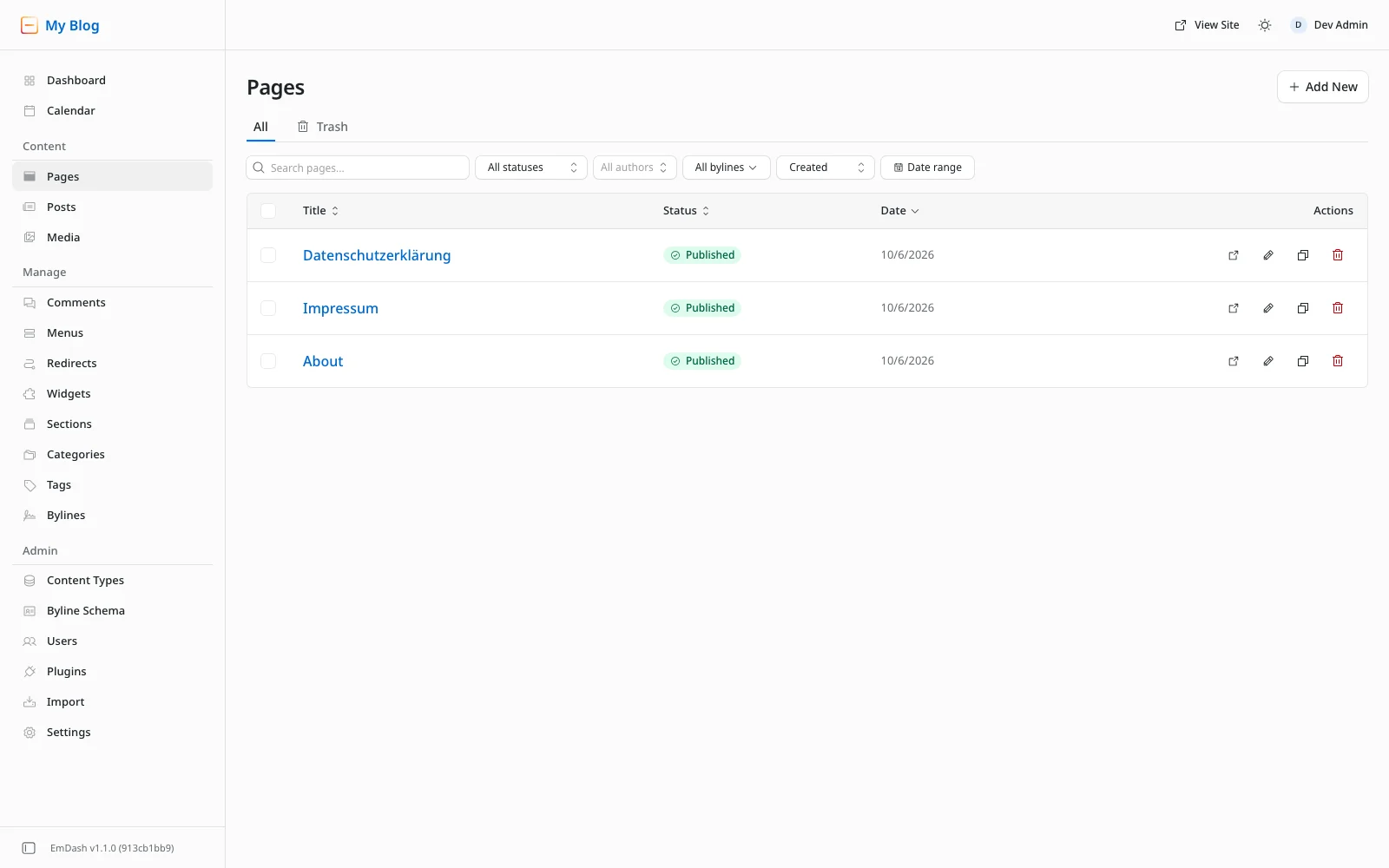
Under Content → Pages, click Add New. The editor opens as "New Page". Type "Impressum" into the Title field and the text below it under Content. On the right, under URL & language, EmDash fills in the Slug from the title, impressum in this case.
You can write the text straight into the editor, or copy it from a generator or from your lawyer's template. For subheadings, use the H button in the toolbar or type ## and a space at the start of a line. If you paste text in, copy it from a rendered view, such as your browser or a Markdown preview. The editor doesn't turn Markdown characters into formatting when you paste.
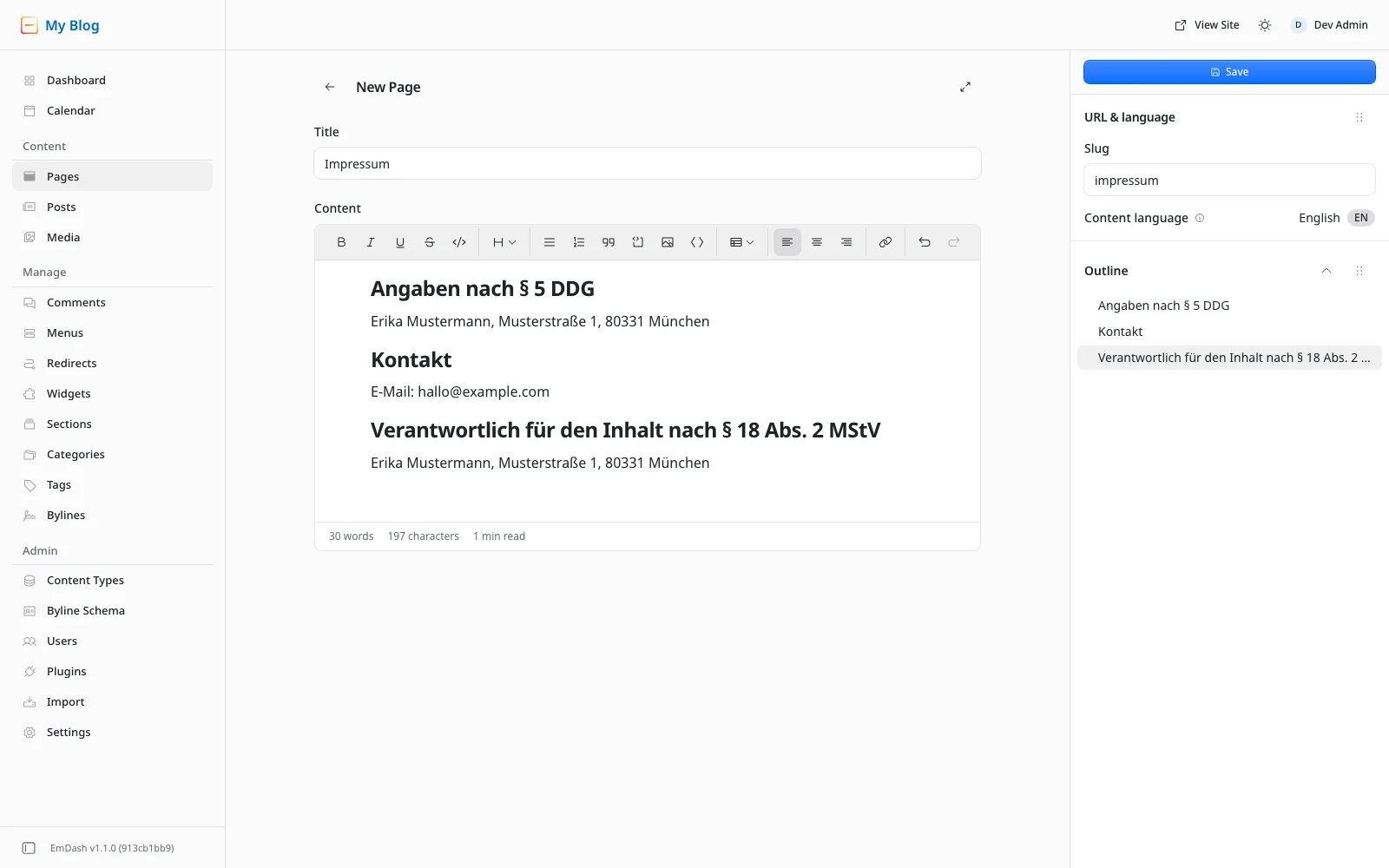
Then click Save at the top right. Only after that does the Publish now button appear. EmDash asks once more ("This content will be visible on the site immediately."), and Publish now in the dialog puts the page online.
Watch the slug on the privacy policy. From the title "Datenschutzerklärung", EmDash makes datenschutzerklärung, umlaut included. It works, but it looks encoded in the address bar and is awkward to type. I enter datenschutz by hand before saving. You can change a slug later, but links that are already out there will break.
Where the pages live
The blog template serves pages under /pages/. The content type's URL pattern is /pages/{slug}, and the matching Astro route is src/pages/pages/[slug].astro. So your legal notice is at /pages/impressum and the privacy policy at /pages/datenschutz. That's perfectly fine legally, because what counts is the link, not the address.
Here on The Weekly Dash, the pages sit directly at /impressum and /datenschutz, because we've reworked the template. If you want that too, you need your own route and a different URL pattern, which means code. I show how that works in principle in Your first custom content type.
An English version
For a German site, a German legal notice is enough. If your site is bilingual, you create the English pages as translations. That only works once your site is multilingual, though. EmDash reads its languages from Astro's i18n configuration, and the blog template doesn't set one up. Making the template multilingual is a topic of its own.
Once it is, the editor shows a Translations section on the right. Next to each missing language there's a Translate button. EmDash then creates a new entry in that language and copies the original's content and slug. You change the slug under URL & language; our English pages are legal-notice and privacy. That works because a slug only has to be unique per language.
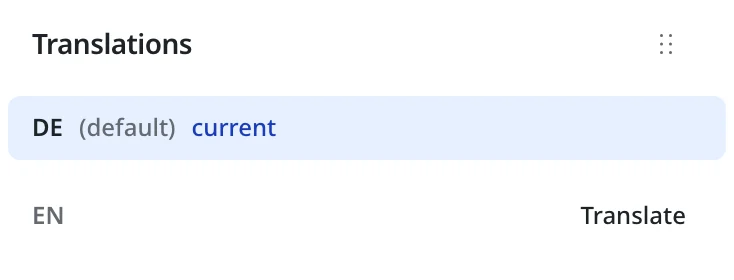
At the top of our English privacy policy we say that the German version prevails if the two differ. That way you don't have to keep two texts equally watertight in legal terms.
Reachable from every page: the footer link
The pages are online, but nothing links to them yet. The blog template has two places for that which you can fill without code.
The first is the "Navigate" column in the footer. It shows the Primary Navigation menu, and that same menu also appears in the header. If you add the legal notice and the privacy policy there, they'll sit at the top next to Home, About and Posts. That's allowed, but too prominent for most sites.
The second is the Footer widget area. In the template it holds the short "About" text, and that's where I hooked in a separate menu for the two pages. It takes two steps.
A "Legal" menu
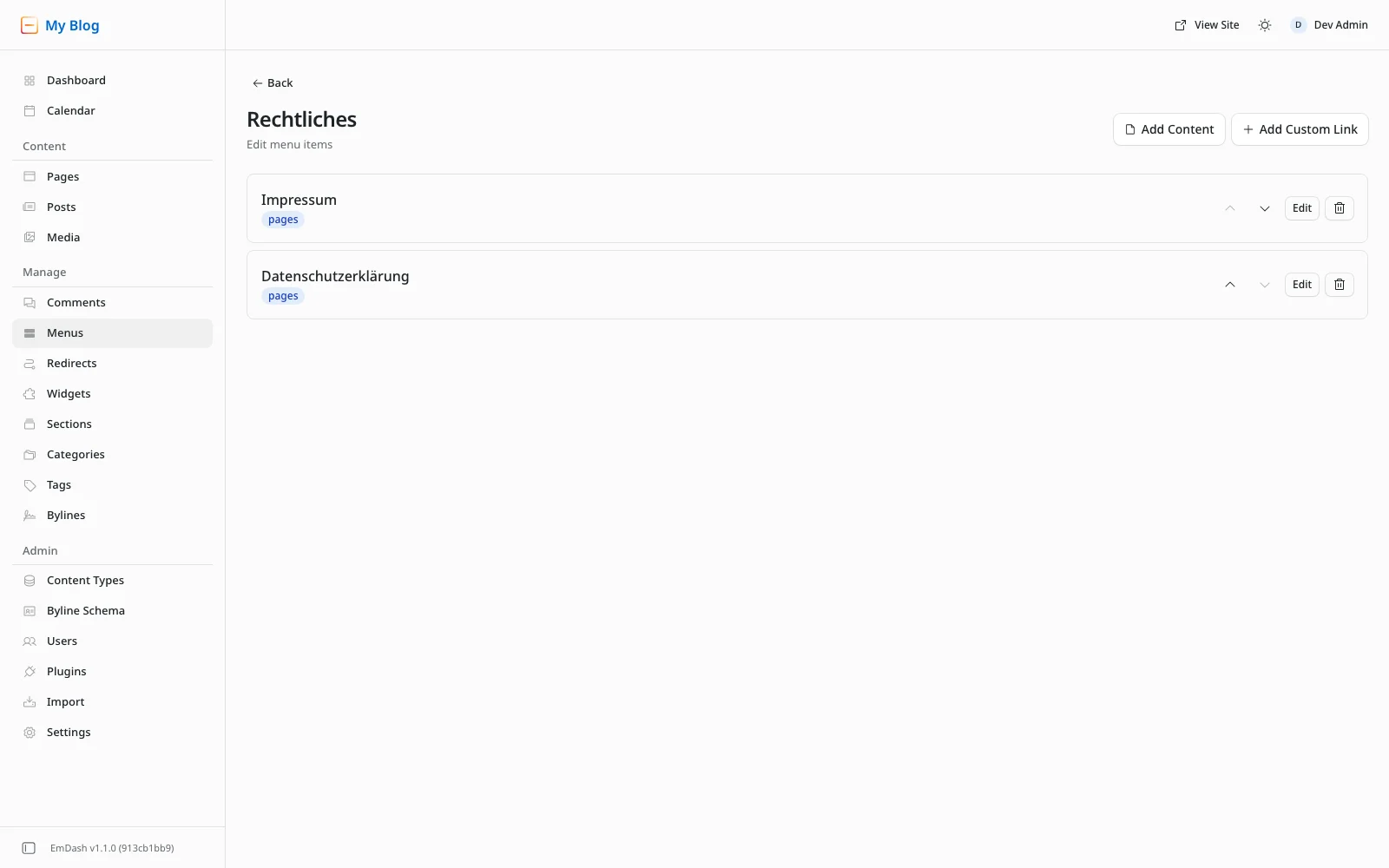
Under Manage → Menus, click Create Menu. Enter a Label, I used "Rechtliches" because the site is German, and legal as the Name. The name is the fixed identifier your site uses to fetch the menu, and you can't change it later. Create takes you to the empty menu.
Now click Add Content. The Select content dialog lists all published pages; one click on "Impressum" adds it. Do the same for the privacy policy. If you want to change an item's text, use Edit.
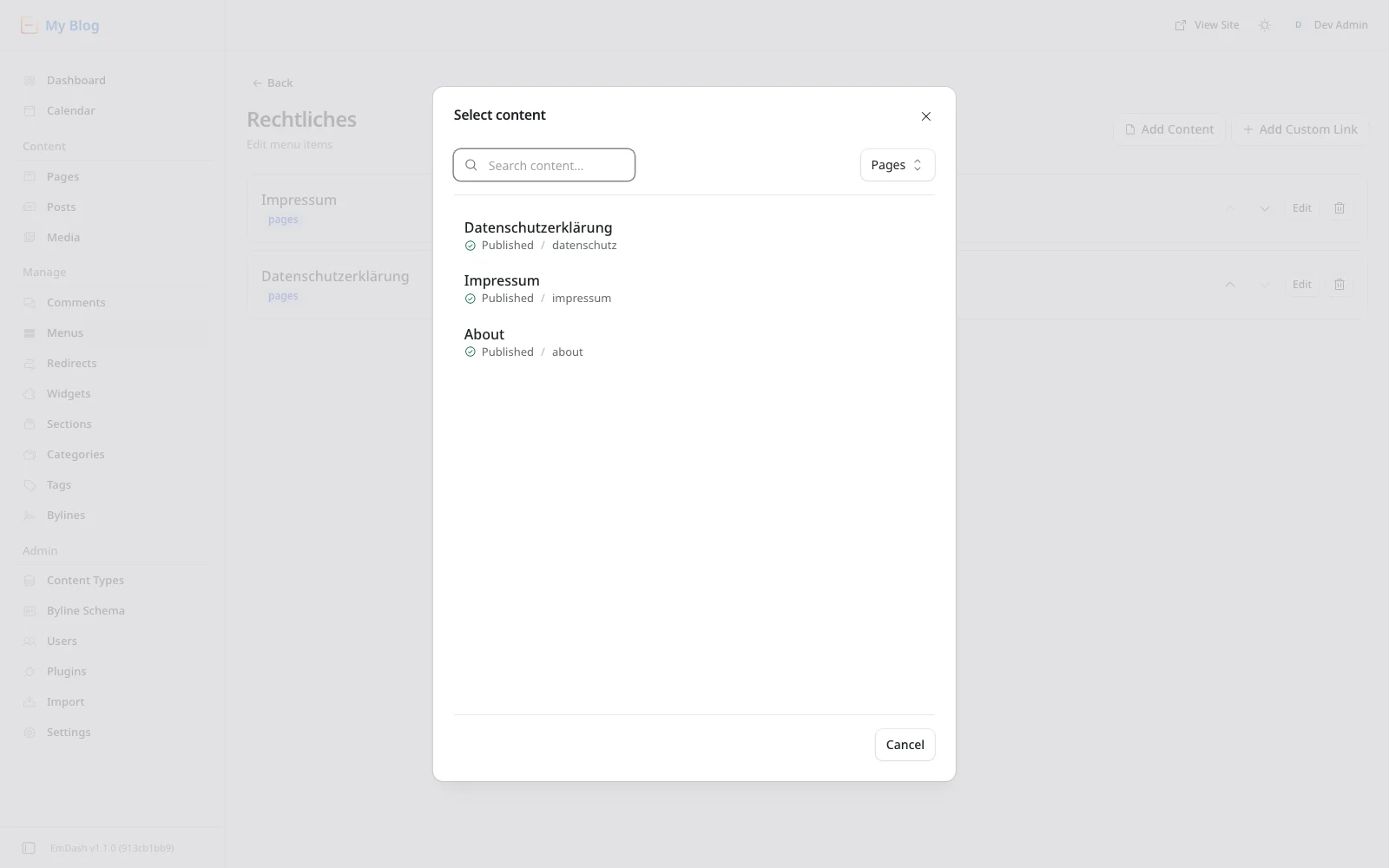
Use Add Content here, not Add Custom Link. A menu item that points to an entry remembers the entry, not the address. EmDash rebuilds the URL from the URL pattern on every request, and on a multilingual site it picks the translation in the current language. A link you type in yourself, like /pages/impressum, breaks as soon as the slug or the pattern changes.
Putting the menu in the footer
Under Manage → Widgets, you'll see the Available Widgets on the left and the Footer and Sidebar areas on the right. Drag the Menu widget into the Footer area, below the About entry. Then click the new entry to expand it. Enter a Title, pick your menu under Menu, and click Save.
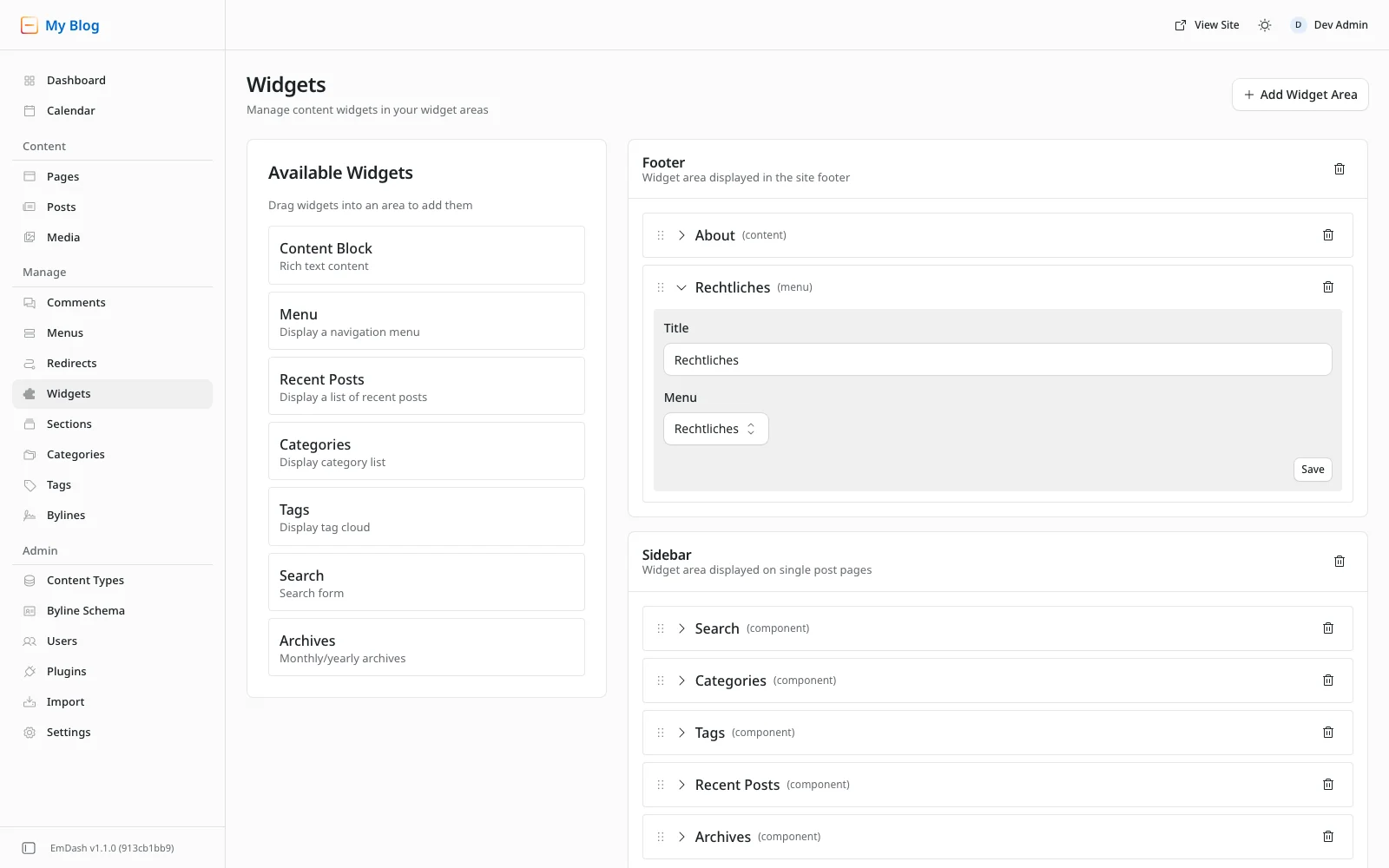
From the next request on, the block appears in every footer on the site, because all of the template's pages share one layout. I checked it logged out on the home page, on a post and on the legal notice itself.
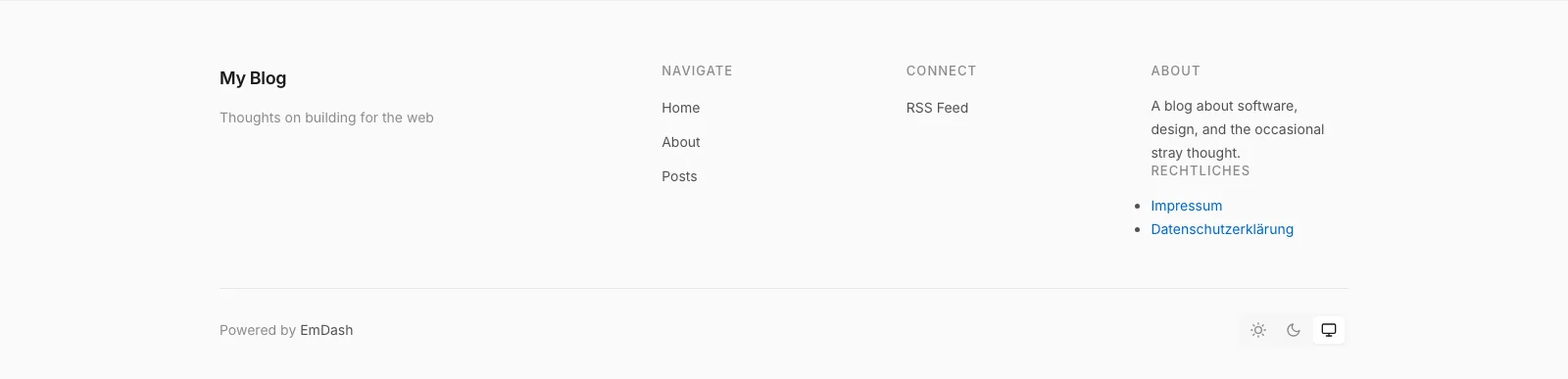
It isn't pretty yet. The template doesn't style menu widgets like the other footer columns, so the links appear with bullet points and in link colour below the About text. Legally that doesn't matter; the links are on every page. If you want it to match, it takes a few lines of CSS.
On The Weekly Dash we took a third route. Our footer is our own code, and the links to the legal notice and privacy policy are fixed in the layout, with the slugs per language in a small lookup table. That's only worth it if you're building the layout yourself anyway.
What goes into the privacy policy
Now for the part where most generators have to guess. A privacy policy describes what your site actually does, and a generator doesn't know your site. It asks you about services, and if you don't know what EmDash and Cloudflare do behind the scenes, you'll tick too many boxes or too few. So I looked instead of guessing.
First, I opened theweeklydash.com in a headless browser, logged out, like a new visitor. Across five pages, including the home page, the legal notice and the privacy policy, the site set not a single cookie and stored nothing in local storage or session storage. The browser loaded from just two hosts: theweeklydash.com itself and static.cloudflareinsights.com. The fresh blog template running locally did even less: no cookie and no third-party host, not even on a post with a comment form. Then I checked the EmDash 1.1.0 source to see why.
That gives you the building blocks for a typical EmDash site on Cloudflare.
Hosting on Cloudflare
Your site runs as a Worker, the database is D1 and the images live in R2. On every request, Cloudflare processes what every browser sends along: IP address, time, the address requested, the referrer and the browser identifier. That goes into the policy, with the purpose (delivering and protecting the site) and the legal basis, usually legitimate interest under Art. 6(1)(f) GDPR.
Cloudflare is your processor here, and that requires a contract under Art. 28 GDPR. With a regular account you don't have to sign one separately. The Self-Serve Subscription Agreement you accept when creating your account expressly incorporates Cloudflare's Data Processing Addendum. It covers the Swiss FADP too. Still, save the current version as a PDF with your records, so you can show it if anyone asks.
Data may go to the US in the process. Cloudflare is certified under the EU-U.S. Data Privacy Framework, and under the Swiss-U.S. Data Privacy Framework for Switzerland, and has also signed the Standard Contractual Clauses. That belongs in the policy as well.
Where your database and images live is decided when you create them. With a location hint, D1 and R2 end up in Western Europe, for example; why that's worth it for load time too is covered in Where does your database live?. But don't write "all data stays in the EU". Cloudflare answers each request in the data centre closest to your visitor, and that can be anywhere in the world.
That leaves the logs. Cloudflare stores your Worker's logs through Workers Logs, and according to the docs that's on by default for every newly created Worker. The blog template's wrangler.jsonc has no observability entry. Wrangler then sends nothing about it on deploy, and Cloudflare's default applies. So after your first npm run deploy, Workers Logs is running. Today the logs are kept for three days on the Free plan and seven on the Paid plan. From 1 December 2026, Cloudflare's new Observability pricing applies, and then it's seven days on the Free plan too. That's why our policy says logs for troubleshooting are deleted after seven days at the latest. If you don't want any, add "observability": { "enabled": false } to your wrangler.jsonc and deploy again.
Visitor statistics with Cloudflare Web Analytics
The second host from my measurement, static.cloudflareinsights.com, belongs to Cloudflare Web Analytics, also called RUM. You don't add that script yourself. If your domain is a zone on Cloudflare, Cloudflare injects it into every page on delivery. According to the docs it's even switched on automatically for zones on the Free plan, there excluding visitors from the EU. If your site still runs on a workers.dev address, as at the end of Kevin's article, there's no zone and no such script.
Whether and how it runs for you, you'll find in the Cloudflare dashboard under Web Analytics, in the entry for your hostname. If it's running, it goes into the policy. The script measures load times and sends them to Cloudflare along with the page address, referrer, browser and device type. According to Cloudflare, it stores nothing in the browser, sets no cookies and discards the IP address at the nearest data centre.
No cookies doesn't automatically mean no consent, though. Section 25 TDDDG, the German law on privacy in digital services, requires consent not only for storing things in the browser but also for accessing information already on the device. The script reads measurements from the browser. Whether that falls under section 25, and if so whether the exemption for "strictly necessary" access applies, is a matter of debate. We run Web Analytics without a banner and rely on our legitimate interest. If you want to play it safe, switch Web Analytics off. You'll still get the request and traffic figures in your zone's dashboard, because Cloudflare measures those on the server.
Fonts
The blog template loads its fonts through fontProviders.google(). That sounds like Google, but not for your visitors. Astro's Fonts API downloads the files at build time and serves them from your own domain under /_astro/fonts/. I checked the HTML that theweeklydash.com delivers: neither fonts.googleapis.com nor fonts.gstatic.com appears in it. I explain the background in Logo, colours, fonts.
This matters because in 2022 the Munich Regional Court awarded damages to a visitor whose IP address a website had passed to Google through dynamically embedded Google Fonts (LG München I, judgment of 20 January 2022, 3 O 17493/20). With the template, that doesn't happen. You don't need to write anything about it in the policy, but a sentence like "We serve our fonts ourselves" makes things clear.
Comments
The template shows a comment form under every post. When someone submits a comment, EmDash stores in your database:
- name and email address, both required,
- the text and the time,
- a salted hash of the IP address and the browser identifier (user agent), to fend off spam and abuse,
- the status, that is, whether the comment is pending, approved or rejected.
Publicly, the template shows the name, the text and the date. EmDash accepts at most five comments per IP hash in ten minutes. It cleans up the entries for that after an hour at the earliest. The hash and the user agent on the comment itself, on the other hand, aren't deleted automatically; they stay as long as the comment does. That's how it should read in your policy.
You set how strictly comments are moderated under Admin → Content Types → Posts, in the Comments section. The default is First-time commenters only: the first comment from an email address waits for your approval, later ones appear right away. If you don't want comments, turn off Enable comments there, and the whole section drops out of your policy.
EmDash also has Cloudflare Turnstile built in as spam protection, but it's off in the template. If you turn it on, the form loads a script from challenges.cloudflare.com, and that goes into the policy too. You can see how we handled it in section 6 of our privacy policy. Comments get a detailed look in a later part of this series.
Contact by email
Your legal notice includes your email address. Anyone who writes to you sends you data, and the policy says what you do with it. If you use Cloudflare Email Routing, Cloudflare accepts the message and forwards it to your actual mailbox. Then you name both, Cloudflare and your mailbox provider. Ours land in a shared mailbox that we run in our own Cloudflare account, so we only name Cloudflare.
If your second way of getting in touch is a contact form, that goes into the policy too: which fields it asks for, where the message goes and how long you keep it. The blog template doesn't come with a form. Ours sends the message as an email to the same mailbox, stores nothing on the site itself and is protected with Turnstile, like the comments.
EmDash itself only sends email if you set up an email plugin, for invitations, sign-in links or notifications about new comments, for example. The blog template doesn't include one. If you add one later, say through Cloudflare Email Sending, update the policy.
Signing in to the admin
After you sign in with a passkey, the admin sets a session cookie called astro-session. It's httpOnly and only lasts until the browser is closed. It concerns only you and your editors; visitors never get it. So it doesn't belong in a privacy policy for visitors. If several people write for your site, tell them directly.
Cookies, and do I need a banner?
On public pages, EmDash 1.1.0 sets no cookie for a visitor. I searched the source for every cookie it sets. All of them concern signed-in users, the setup or the WordPress import.
One cookie comes from the template itself. If someone explicitly picks the light or dark colour scheme in the footer, the site remembers that in a theme cookie for a year. Choosing "System" deletes it again. That cookie stores a setting the visitor asked for. That puts it under the exemption in section 25(2) no. 2 TDDDG, so it needs no consent, but it does go into the policy. Cloudflare may also set security cookies such as __cf_bm if you turn on bot protection features.
You need a cookie banner when you use something that requires consent. That's mainly tracking, advertising and embedded content from other providers: YouTube videos, maps or social media posts. The template comes with none of these. So with the setup from this article you don't need a banner, with the Web Analytics caveat from above. A banner that doesn't ask for anything doesn't protect you; it just annoys your readers.
Switzerland is more relaxed. If you process data on your visitors' devices, for example by setting a cookie, Art. 45c(b) of the Telecommunications Act (FMG, SR 784.10) doesn't require prior consent. It's enough to inform people about the processing and its purpose, and to point out that they can refuse it.
How ours is structured
Our privacy policy follows exactly these data flows. It has twelve sections:
- Controllers, two in our case, because we run the site jointly (Art. 26 GDPR)
- In short, four sentences for everyone who won't read further
- Hosting and delivery through Cloudflare, with the processing agreement and the Data Privacy Framework
- Visitor statistics with Cloudflare Web Analytics
- Comments
- Spam protection with Cloudflare Turnstile, for comments and the contact form
- Search
- Cookies, meaning
themeand possible security cookies from Cloudflare - Contact by email and through the contact form
- Links to social networks, which load nothing until clicked
- Your rights, with the supervisory authorities in Bavaria and Switzerland
- Changes
A date sits at the very top. Whenever something on the site changes that affects data, such as a video embed or a newsletter, we update the policy in the same step. Our legal notice is shorter: the section 5 DDG details with both names and addresses, an email address and the contact form at /en/contact as ways to reach us, and the person responsible under section 18(2) MStV.
Generator, template or lawyer?
There are generators for both pages, free and paid, for Germany and Switzerland. For a small site they're a usable starting point, as long as you give them the right answers. With this article you know which services your site really uses. Still, check the result paragraph by paragraph and delete whatever doesn't apply to you. A paragraph about Google Analytics, which you don't even use, is wrong, however well meant.
If the site earns you money, whether as a company, a freelancer or through ads and affiliate links, have both texts checked by a lawyer. German competitors and associations can send you a formal warning letter (Abmahnung) with fees attached, and a check usually costs less than a single one of those.
Checklist before launch
- Legal notice created, with name, a postal address where you can be served, an email address and a second quick way to get in touch, plus the extra details for a company.
- Privacy policy created, dated, and listing exactly the services your site uses.
- Slugs checked, so
datenschutzrather thandatenschutzerklärung. - Both pages published, not just saved.
- Linked in the footer, and checked logged out on the home page, a post and the 404 page.
- Web Analytics checked in your zone's dashboard, with the policy and the setting matching.
- Comments decided, either on with a matching section in the policy, or off.
- No embeds without a plan, so no YouTube video and no map until you collect consent.
- Cloudflare's Data Processing Addendum saved in its current version.
- English version, if you have one, linked from the English footer.
Wrapping up
Back to the question from the start. You can put your site online once two pages are in place. In Germany you almost always need a legal notice, because of section 18 MStV even for a private blog. In Switzerland you need one if you're selling something. You need a privacy policy in both countries, because delivering any page already processes IP addresses.
In EmDash, both pages are two entries under Pages. You link them through a menu of their own, placed as a widget in the footer of every page. No code required. And an EmDash site on Cloudflare processes less than many generators assume: no cookie for visitors, no fonts from Google, no third-party services apart from Cloudflare itself. Write exactly that into your policy, no more and no less.

Comments
No comments yet
First-time comments appear once we've approved them. How we handle your details