Checked with EmDash 1.2.0 on Node.js 24 on 9 October 2026, against the EmDash source code and the official docs.
Shortly after EmDash 1.0 came out, Roger Montti published an article at Search Engine Journal with a blunt title: "EmDash 1.0 Challenges WordPress Freedom With Cloudflare Lock-In" (article). His argument: EmDash is modern and more secure than WordPress, but it ties you to Cloudflare's infrastructure. Almost every 1.0 feature depends on Cloudflare, and even the decentralized plugin registry is under Cloudflare's control.
Before you read on, two things you should know. I'm a maintainer on EmDash, and this website runs on Cloudflare. So I have a reason to make EmDash look good. That's why I didn't rely on my opinion. I checked every claim against the source code and the docs, and I ran EmDash without Cloudflare on a Node.js server, including a plugin from the registry.
The result: Montti is right on several points but wrong on the main one. EmDash isn't chained to Cloudflare. It's just a lot more convenient on Cloudflare.
What the article claims
Montti makes four points you can check:
- Many features depend on Cloudflare and make it difficult to host EmDash without it.
- All four new 1.0 features tie you to Cloudflare.
- Despite its decentralized design, the plugin registry is under Cloudflare's control.
- Everything EmDash offers in AI features can already be done with WordPress.
On top of that come two judgements: Cloudflare isn't an open source company, and its approach is borrowed from Google. I'll come back to those at the end.
Does EmDash run without Cloudflare?
Yes, and officially so. The docs have a dedicated guide for Node.js (docs). It requires Node.js 22.16 or later and shows a setup with SQLite and local storage for a single server, plus a Dockerfile. If you run several servers, you use PostgreSQL or libSQL as the database and S3-compatible storage such as MinIO for media. EmDash's code is MIT licensed (license).
I didn't want to just read about it. So I created a new Node.js site with the official installer:
npm create emdash@latest my-site -- --template blog --platform nodeCreating and installing took 50 seconds, the build 9 seconds. After that the site ran on my Mac with node ./dist/server/entry.mjs, with SQLite as a file in the project folder. The home page came back after 441 milliseconds on the first request, and EmDash created the default content by itself on first start. No Cloudflare account, no Wrangler, no bindings.
One thing works differently on Node.js: scheduled publishing, plugin tasks and maintenance only run while the Node process is running (docs). On a regular server that's a given. On hosts that put idle processes to sleep, it isn't.
What about plugins?
This is where it gets interesting, because the sandbox is EmDash's flagship feature. On Cloudflare, every plugin runs as its own Worker through the Worker Loader binding, which is only available on the paid Workers plan. On Node.js, EmDash instead starts workerd, the open source runtime behind Cloudflare Workers, as a separate process and runs the plugins inside it (docs).
The installer doesn't set this up on Node.js, though. According to its help text, the sandboxed plugins option is for Cloudflare only, and my new site had no sandbox even though I'd passed the option. Adding it was easy:
npm install @emdash-cms/sandbox-workerd workerdPlus one line in astro.config.mjs:
emdash({
	// ...
	sandboxRunner: "@emdash-cms/sandbox-workerd/sandbox",
});
Installing the two packages took 7 seconds. After that the admin showed the registry under Plugins, with the same plugins as on Cloudflare.
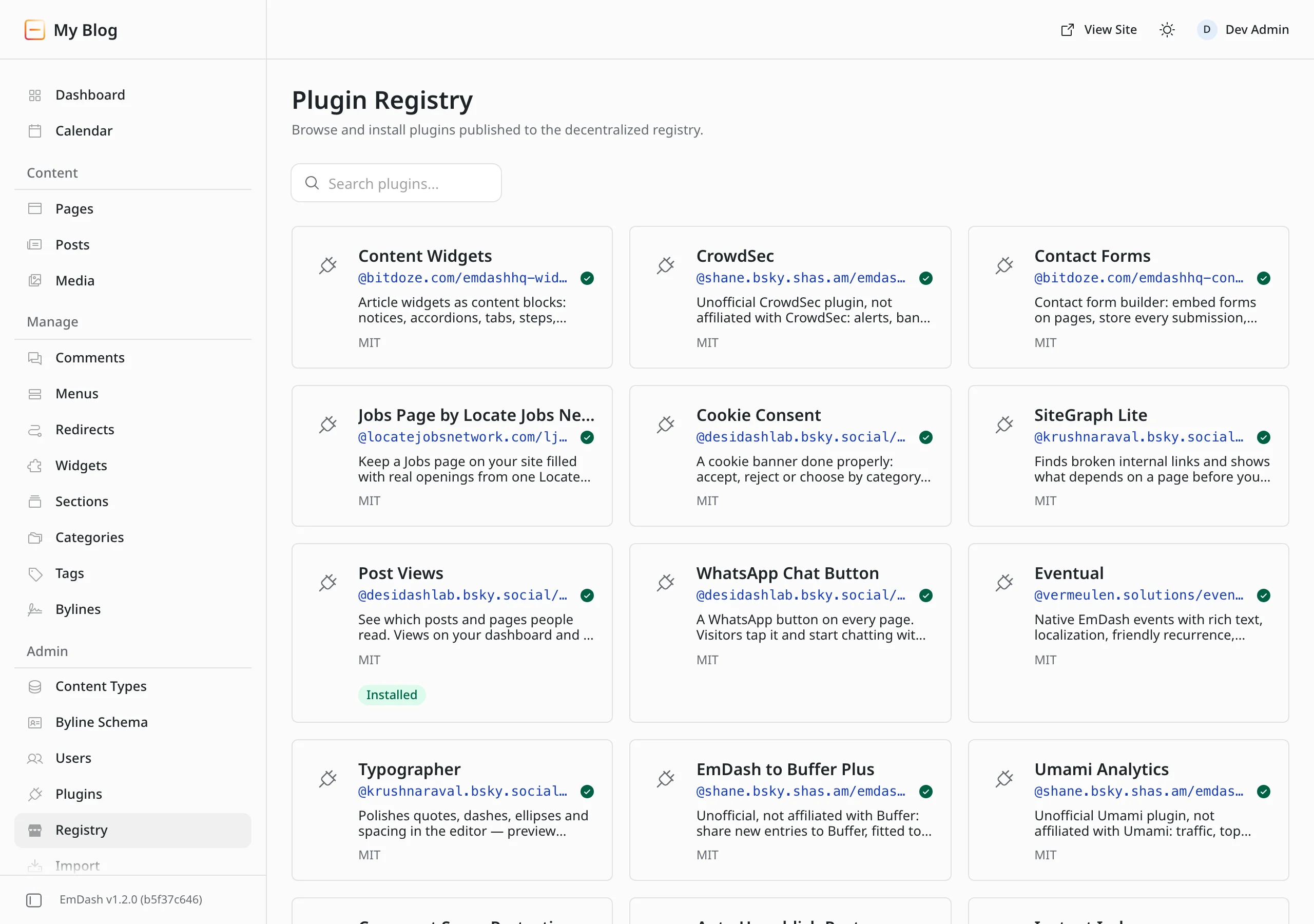
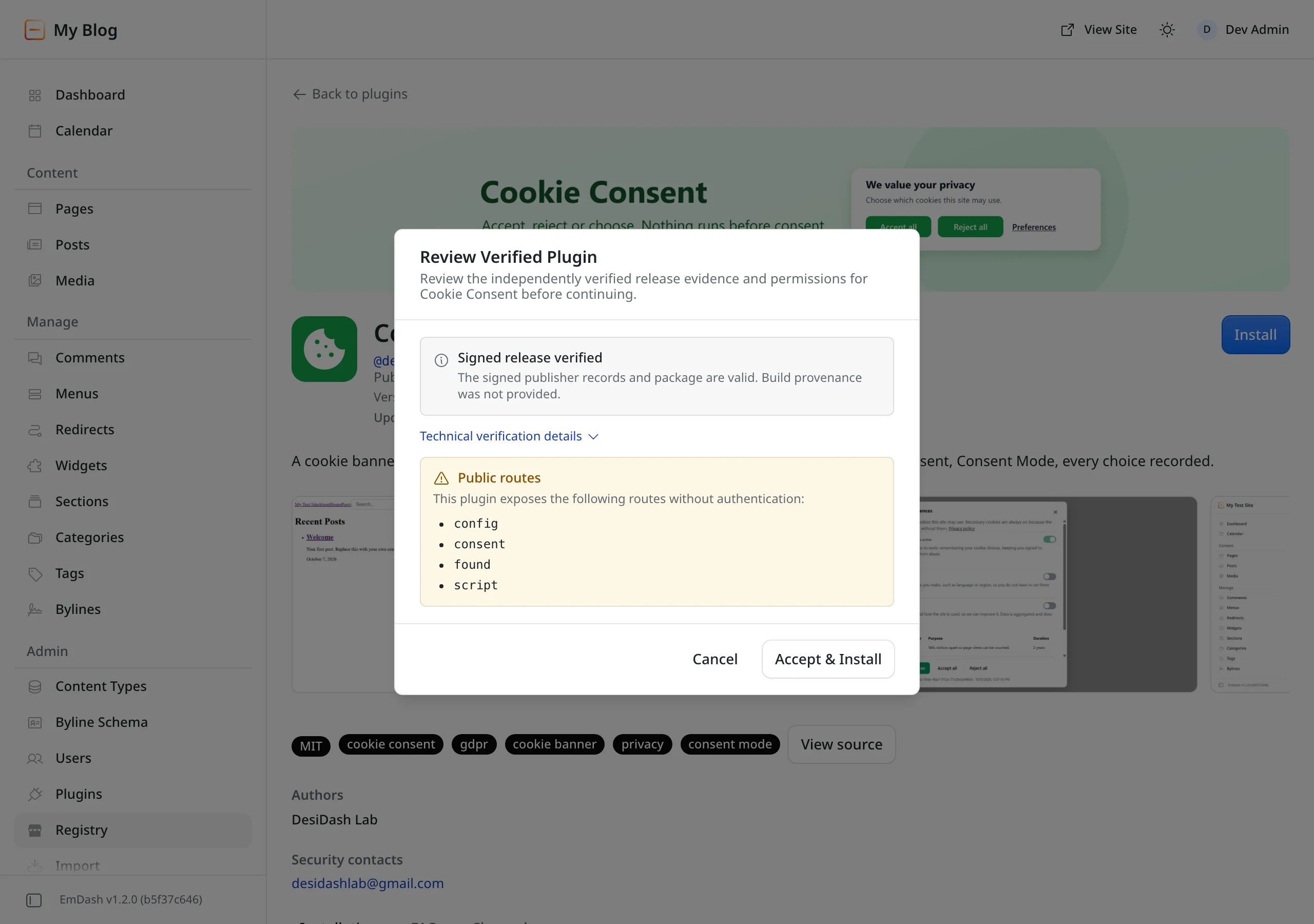
I installed Post Views, a plugin that counts page views. Before installing, EmDash shows the signature check and the requested permissions, on Node.js just as on Cloudflare. The install itself took 2 seconds.
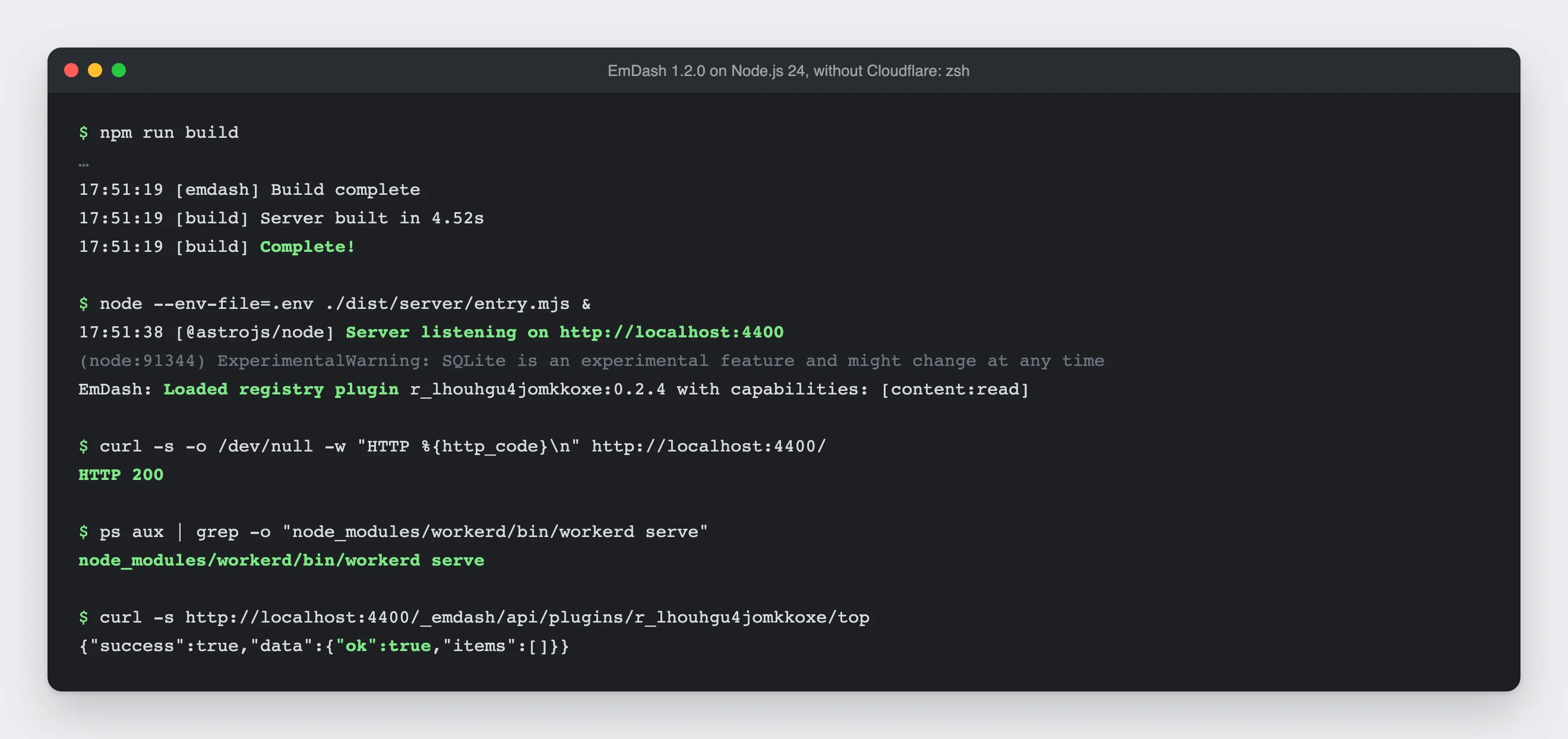
Then I built the site for production and started it with node ./dist/server/entry.mjs. EmDash loads the plugin at startup, starts workerd from the project folder, and the plugin's routes answer from the sandbox in under 20 milliseconds.
There's one difference you should know about, though. On Cloudflare, the sandbox limits every plugin to 50 milliseconds of CPU time, 10 outgoing calls and 30 seconds of wall time. On Node.js, only the wall time applies (docs). So a plugin there can't reach your data or the network unless it declared that, but it can keep your server busy for 30 seconds. How strictly the limits apply on Cloudflare is something I measured in EmDash plugin sandbox: what it protects, what not.
Cloudflare as host or as a proxy in front
"Without Cloudflare" can mean two things. Many WordPress sites use Cloudflare, but only as a proxy and CDN in front of their own server: Cloudflare filters attacks and serves images and scripts, while the server builds the pages. That works with EmDash too. So for EmDash there are three setups:
All on Cloudflare | Own server, Cloudflare as proxy | No Cloudflare at all | |
|---|---|---|---|
EmDash runs on | Workers | Node.js | Node.js |
Database | D1 | SQLite, PostgreSQL, libSQL | SQLite, PostgreSQL, libSQL |
Plugin sandbox | Worker Loader, all limits | workerd, wall time only | workerd, wall time only |
Pages in the edge cache | yes, purged on publish | possible, you build the purge | no, bring your own cache |
Protection from attacks | Cloudflare | Cloudflare | up to you |
The proxy changes little about EmDash itself, because EmDash barely notices it. Everything that runs through bindings in the Worker stays with the first column. So these points apply to both setups with your own server:
- Email. Without a mail plugin, EmDash sends no invites, sign-in links or account recovery emails, and you have to pass on invite links by hand. The official plugin for Cloudflare Email Sending needs a Worker binding. For Node.js, the docs only name the community-maintained emdash-smtp, which connects SMTP and services such as Amazon SES, Brevo or Postmark (docs).
- Backups. D1 comes with Time Travel, meaning recovery points for the last 7 or 30 days depending on your plan. For SQLite, the docs recommend SQLite's backup command followed by an integrity check of the copy (docs). The built-in JSON backup in the admin works everywhere. What each option covers, I compared in EmDash backup: every option tested and compared.
- Semantic search. The two search plugins in the Cloudflare package, AI Search and Vectorize, need Worker bindings (source). The built-in full-text search uses the database and needs no binding.
- Bot detection for paid content. If you want x402 to charge only bots, you need EmDash on Workers with Bot Management (docs). A proxy in front isn't enough, because EmDash reads the bot score from the Workers request object. Without it there's no error: EmDash treats every visitor as human, and nobody pays.
- Object cache. On Node.js, EmDash caches queries only in the memory of each process, and several servers don't share that cache (docs).
The proxy does make two things better, though, and one of them hides a trap.
Page cache. Cloudflare doesn't cache HTML by default (Cloudflare docs), but it does with a Cache Rule. On Node.js, Astro sends the right headers along: CDN-Cache-Control for the duration and Cache-Tag for targeted purging. I checked that in the source of Astro 7.3.8. But nothing purges anything at Cloudflare when you publish: Astro's cache on Node.js lives in memory, and that's the only place it purges. Without your own script calling the purge API, readers only see a corrected article once the cache duration runs out. How purging happens by itself on Workers is covered in Fast and still fresh: edge caching EmDash on Cloudflare.
IP addresses. On Workers, EmDash trusts the CF-Connecting-IP header by itself. On Node.js it only does so if you allow it with trustedProxyHeaders: ["cf-connecting-ip"]. If you forget, EmDash skips the rate limits on sign-in attempts, and all visitors share one limit of 20 comments per 10 minutes (docs). If you do allow it, your server must really accept requests only from Cloudflare, for example through a Cloudflare Tunnel or a firewall that only lets Cloudflare's IP ranges through. Otherwise an attacker sends the header straight to your server, claims a new address on every request and gets around the limits. The docs warn about this too. Without a proxy, the same applies to your own reverse proxy's header, such as x-real-ip.
You can still store media in Cloudflare R2 in both setups, through its S3 API (docs). The docs describe Cloudflare Access as an admin login only for sites on Cloudflare. You don't need it, though: passkeys and EmDash's other sign-in methods work everywhere.
The four new 1.0 features
Montti names four new features that all tie you to Cloudflare. That's true for two of them, but those two aren't part of the CMS at all.
Hyperdrive. This adapter connects EmDash on Cloudflare to PostgreSQL more efficiently. It really does only work on Workers. But it's an extra: EmDash supports PostgreSQL itself without Cloudflare through its own adapter (docs). There's one catch: sandboxed plugins don't run with Hyperdrive (docs).
Workers Cache. This is a Cloudflare adapter too. On Node.js, EmDash caches intermediate results in memory, and you can put any cache or CDN you like in front.
Per-project sandbox containers and Git history through Cloudflare Artifacts. Both belong to EmDash Build, the AI builder where you describe a site in a chat. EmDash Build is a separate project and, by its own description, runs in a Cloudflare Sandbox (repository). Daniel tried out what it can do in EmDash Build tested. Here Montti is right: if you use EmDash Build, you use Cloudflare. The CMS itself needs neither.
Who owns the plugin registry?
The registry at plugins.emdashcms.com is run by the EmDash project, and it moderates what it shows. That much Montti gets right. The question is what follows from it.
Plugins don't live in this registry. Publishers release them through the AT Protocol in their own account, and the registry only collects those releases. If a plugin is hidden there, the release stays, as Montti himself quotes from the docs. Which registry your site asks is set in astro.config.mjs with registry.aggregatorUrl, and registry: false turns it off entirely (docs). You can install plugins from npm anyway, without any registry (docs).
Two limits belong to the picture, though. First, acceptLabelers lets you pick additional moderation services, but it can't override the registry's own rules (docs). If you don't want to follow emdashcms.com's moderation, you need a registry of your own. Second, its code is open under MIT, but it needs D1, Queues and Durable Objects, so Cloudflare (source). Anyone can run their own registry, just in their own Cloudflare account.
That's a real difference from the WordPress.org directory, where account, package and catalog sit in one place. But it isn't entirely free of Cloudflare either.
Can WordPress do all of this?
Montti writes that all the AI features from the announcement can already be achieved with WordPress. That's partly true. Since WordPress 6.9, the Abilities API is in core, and the official MCP Adapter plugin makes it available to AI agents. It has more than 40,000 active installs and is at version 0.7.0, so still before 1.0.
The difference: in EmDash, the MCP server is built in and runs on every site without a plugin, on Node.js just as on Cloudflare. With WordPress you need a plugin that isn't stable yet. It's not equivalent yet, but the gap is smaller than EmDash's announcement suggests. Whether switching is still worth it for agencies, I weighed up in EmDash vs WordPress: A Guide for Agencies.
What holds up and what doesn't
Claim | True? |
|---|---|
EmDash is hard to host without Cloudflare | No. Node.js, Docker, SQLite, PostgreSQL and S3 are documented, and the site ran for me without Cloudflare. |
Many features depend on Cloudflare | Partly. The templates and the installer are built for Cloudflare, and on Node.js you add the sandbox yourself. |
All new 1.0 features tie you to Cloudflare | Partly. Hyperdrive and Workers Cache are adapters with alternatives. Containers and Artifacts belong to EmDash Build. |
Cloudflare controls the plugin registry | Partly. The default registry moderates, but you can switch it or turn it off. Running your own needs Cloudflare. |
All AI features work with WordPress too | Partly. MCP is available through an official plugin, but before 1.0 and not built in. |
And the judgements?
Whether Cloudflare is an open source company can't be checked; it's a matter of definition. What can be checked is what's open: EmDash, the plugin sandbox, workerd and the registry's code are all under free licenses. I won't comment on the Google comparison. That's Montti's opinion.
Where I agree with him: Cloudflare is the default everywhere. The official templates carry Cloudflare in their names, the installer only offers the sandbox there, and the stricter limits only exist there. If you try EmDash for the first time, you almost inevitably end up on Cloudflare. That isn't lock-in, because you can leave at any time. But it's a clear nudge in one direction, and that's fair to criticize.
If you want to run EmDash on your own server, you can do it today, with or without Cloudflare as a proxy in front. Plan for setting up the sandbox and email yourself, organizing backups yourself and keeping the server running, and for plugins being less strictly limited there. With Cloudflare as a proxy you gain protection from attacks and, if you want, the page cache, but then you have to set trustedProxyHeaders correctly, shield the server from direct access and build the cache purge yourself. If you want to get to know EmDash first, start with the EmDash CMS tutorial.

Comments
First-time comments appear once we've approved them. How we handle your details