Tested with EmDash 1.1.0 on Cloudflare Workers (Paid) and locally with `astro dev` on 5 October 2026. Revised for EmDash 1.2.0 on 7 October 2026. What changed is listed at the end of the article.
If you look after WordPress sites, you know the reports about holes in popular plugins and the updates that then have to go out to every client site. So when Cloudflare introduced EmDash in April, one phrase caught my attention right away: EmDash is the successor to WordPress "that solves plugin security" (announcement). Every plugin runs in its own sandbox and may only do what it declared up front.
In the guide for agencies I wrote that this helps agencies less than it first sounds. I wanted to know more precisely, and as a maintainer on EmDash, the docs alone aren't enough for me. So I built a small plugin that misbehaves on purpose: it makes too many calls, computes for too long and tries to get around the network and environment variable rules. I ran it locally first and then on a throwaway site on Cloudflare.
The result has two sides. The sandbox holds, exactly as strictly as the docs describe. But the plugins agencies build themselves most often don't run in it at all.
Two kinds of plugins
EmDash has two formats (docs). Sandboxed plugins run isolated, install with one click from the registry and declare their permissions in a manifest. Native plugins run in the same process as the site, come from npm and need a new deployment for every install and every update.
Sandboxed | Native | |
|---|---|---|
Runs | isolated | in the same process as the site |
Permissions | enforced by the sandbox | declared, but not enforced |
Limits per call | CPU time, subrequests, wall time | none |
Install | one click in the registry | npm, configuration, new deployment |
Admin UI | Block Kit (JSON) | React or Block Kit |
Custom blocks in the editor | no | yes |
HTML or scripts on the site | no | yes |
The docs recommend the sandbox unless a plugin needs something only native plugins can do. About native plugins they are very clear: "Native plugins have the same access as the host site." A bug in one can take down the whole process.
What only works without the sandbox
A plugin has to run natively as soon as it needs its own React pages or widgets in the admin, brings its own block types to the editor, or outputs HTML, scripts and stylesheets on public pages.
Look at that list with the plugins clients typically order from an agency in mind: a custom field in the editor, a call-to-action block, tracking, a chat widget, a cookie banner. Almost all of it lands on that list. Even EmDash's own plugins for forms and embeds are native. For this part, the trust model is the same as in WordPress: you have to trust the code, because nothing restricts it.
You have to switch the sandbox on
The sandbox isn't active by default. On Cloudflare it needs the paid Workers plan, a binding called LOADER and an entry in the Astro config (docs). The plan costs from $5 a month per Cloudflare account, not per site, and includes 1,000 sandbox workers a month (pricing). For the security the sandbox brings, that's not much money. In the official blog template the binding is commented out, and the entry in the Astro config doesn't exist at all. For my test I added both:
// wrangler.jsonc
"worker_loaders": [{ "binding": "LOADER" }],
// astro.config.mjs
import { d1, r2, sandbox } from "@emdash-cms/cloudflare";
import limitProbe from "limit-probe";
emdash({
database: d1({ binding: "DB", session: "auto" }),
storage: r2({ binding: "MEDIA" }),
sandboxRunner: sandbox(),
sandboxed: [limitProbe],
});When you create a new project, there's an option for this, --sandboxed-plugins. In version 1.1.0 it only enables the binding, though, and 1.2.0 doesn't change that. You still have to add the entry in the Astro config yourself. Otherwise the sandbox stays off and the plugin directory is missing from the admin, even though the wizard reports "Enabled sandboxed plugins".
If either is missing, EmDash doesn't load the plugins on the sandboxed list at all, and an install from the registry fails. The docs mention a way out: you can move such a plugin to the regular plugin list, and then it runs in the same process. But that removes all isolation, and the docs themselves say you should then treat it like a native plugin.
On a regular Node.js server the sandbox runs on workerd. The package for it is at version 0.9.3, and according to the docs it only limits wall time to 30 seconds there, not CPU time or the number of calls.
My test plugin
I started from the EmDash 1.1.0 blog template with the sandbox switched on. With the official tool I created a plugin called limit-probe. It declares two permissions, content:read and network:request, and example.com as its only allowed host. Each route tests one limit, for example the number of storage calls:
kv: {
	public: true,
	handler: async (routeCtx, ctx) => {
		const n = num(routeCtx.input, "n", 20);
		for (let i = 1; i <= n; i++) {
			try {
				await ctx.kv.set(`probe:${i}`, i);
			} catch (e) {
				return { calls: n, okCalls: i - 1, failedAt: i, error: errorText(e) };
			}
		}
		return { calls: n, okCalls: n };
	},
},
First everything ran locally with astro dev, then on a throwaway site in my Cloudflare account on Workers Paid. I deleted it afterwards, along with its database and storage.
Test | Local ( | Cloudflare |
|---|---|---|
10 storage calls | ok | ok |
11 storage calls | ok | 11th call fails |
50 storage calls | ok | 11th call fails |
11 content queries | ok | 11th call fails |
About 10 ms of computation | ok | ok |
About 25 ms of computation | ok | mostly ok, one in five aborted |
About 50 ms of computation or more | ok | aborted |
Declared host | HTTP 200 | HTTP 200 |
Undeclared host | blocked | blocked |
Plain | blocked | blocked |
Environment variables | not visible | not visible |
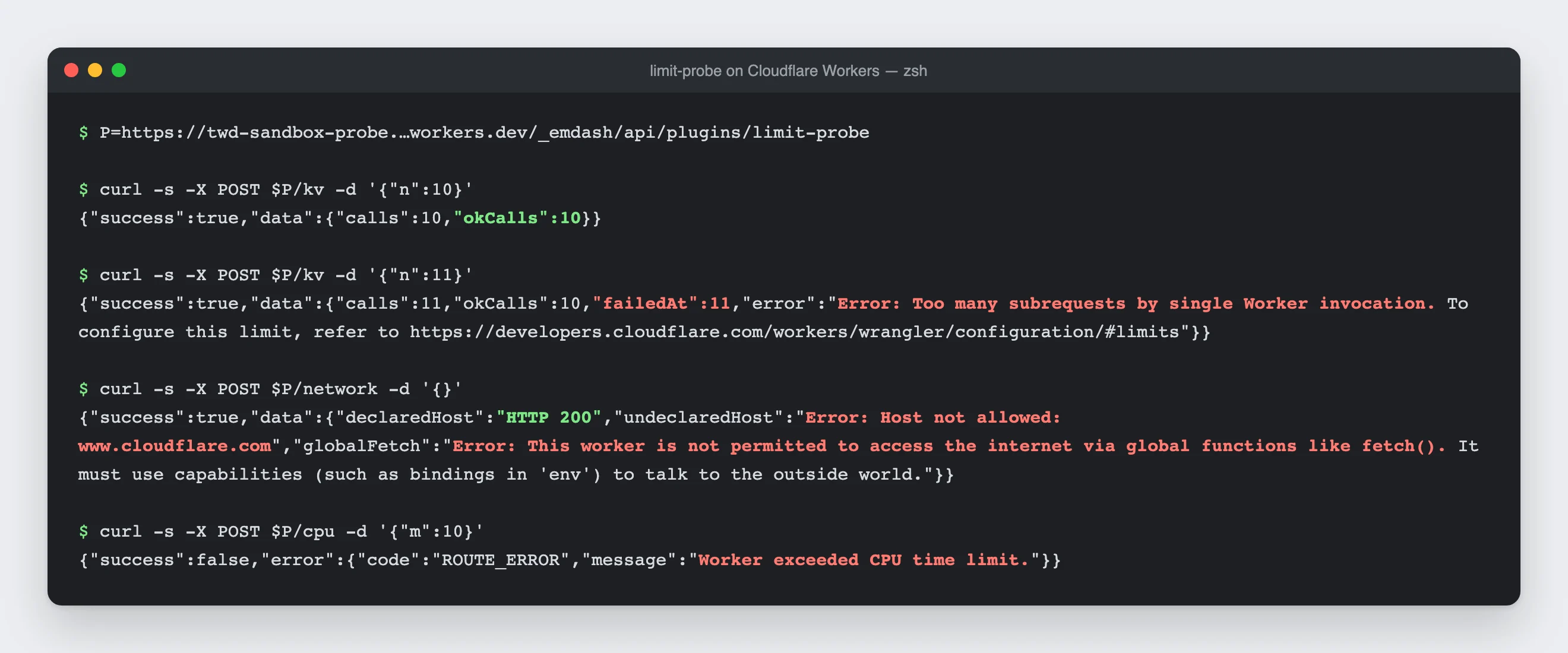
This is what the test site on Cloudflare answered. The site no longer exists, so I recreated the terminal from the responses in my test log.
The eleventh call is the end
On Cloudflare exactly ten calls went through. The eleventh failed with "Too many subrequests by single Worker invocation", whether the plugin wrote to its own storage or queried content through ctx.content. The error message points to a setting in Wrangler, but for sandboxed plugins the limit is fixed, according to the docs.
Ten calls sound like little, and for some plugins they are. A developer measured the same thing independently of me and documented it (Discussion #3869). His shop plugin needs between 21 and 84 storage calls per checkout and so doesn't fit in the sandbox. He also found that a batch call like getMany counts as a single call, which helps when restructuring.
CPU time, and how I tricked myself
With CPU time, I first tripped over my own test. My first version simply computed until a certain amount of time had passed. On Cloudflare it ran forever. Workers freezes Date.now() while code is running, as protection against timing attacks, so for my loop no time ever passed. After that I used a fixed amount of computation and measured locally how long it takes.
With a few seconds' pause between attempts, about 10 milliseconds of work always went through. At about 25 milliseconds, one attempt in five was aborted, and from about 50 milliseconds every attempt failed with "Worker exceeded CPU time limit". When I sent the requests straight after one another, the results scattered much more. So I would plan with clearly less than the 50 milliseconds from the docs. Editing images, parsing large files or converting long texts doesn't belong in a sandboxed plugin.
Locally you notice none of this
For me this is the trickiest point. Locally, 50 calls and half a second of CPU time went through without any warning. The docs do say so, but rather hidden in the chapter on testing (docs): Cloudflare's limits aren't reproduced locally. A plugin that runs perfectly in development can therefore fail only after deployment, on the client's site. Anything that makes many calls or computes a lot, I would test on a preview environment on Cloudflare first.
The isolation holds
The rest was encouraging. The sandbox rejected an undeclared host with "Host not allowed", plain fetch() is blocked completely, and neither process nor environment variables are visible. That was the same locally and on Cloudflare. A registry plugin that wants to quietly send data to a server it didn't declare won't get far in the sandbox.
What the sandbox doesn't cover
The sandbox checks whether a plugin has a permission, but not what it does with it. The docs list the limits openly (docs). The permissions are coarse: a plugin with content:write may change all content, not just its own. You can only approve a release's permissions as a whole; I found no way in the docs to allow only some of them. When a plugin writes to an entry, an editor's edit lock doesn't stop it. And in the sandbox, hook priority and order aren't honoured.
Then there's the registry. Moderation checks a plugin's name, description, links and images, but not its code (1.0 announcement). Signatures prove who a plugin comes from and that it wasn't changed on the way, but not that it's harmless. The docs themselves therefore advise installing code only from publishers you trust.
What I take away for agency plugins
For third-party plugins the sandbox is real progress over WordPress, where every plugin can basically do anything. A form plugin from the registry can't send data to a server it didn't declare up front, and it can't get at your keys. WordPress has nothing comparable.
Your own plugins are a different story. Anything that shows something in the editor or on the site runs natively, and anything meant to run in the sandbox has to make do with ten calls and a few milliseconds of CPU time. Bigger jobs like imports, newsletter sending or stock levels have to be split into small portions and spread over cron, because EmDash doesn't have a queue for background jobs yet.
If I were setting up an EmDash site for a client today, I would switch the sandbox on from the start. The $5 for Workers Paid and the two config entries are a small price for it. Plugins from outside publishers would only go into the sandbox for me, because a native plugin from anyone is the same risk as a WordPress plugin. For our own plugins, I would decide where they run before writing the first line of code, and in the sandbox I would count the calls per request. Testing happens on a preview on Cloudflare, not just locally. And native plugins get the same care PHP code always got: code review, an eye on dependencies and updates across all sites.
Conclusion
EmDash's sandbox works, exactly as strictly as the docs describe. For registry plugins it's the main reason EmDash is in a better position than WordPress on security.
For agencies, though, I would only sign half of the slogan about the solved plugin problem. The plugins we build ourselves most often run without the sandbox, and the sandbox itself is only active once you deliberately switch it on. The few dollars a month for it are worth it. If you know that and plan and review your own plugins accordingly, you still have a much smaller attack surface than with dozens of WordPress plugins from all kinds of sources.
How EmDash compares with WordPress in everything else is in the guide for agencies. And if you've measured yourself and got different numbers, tell me in the comments.
Changes to this article
- : Rechecked for 1.2.0: --sandboxed-plugins still doesn't add the Astro config entry, and the Node.js package is at 0.9.3.

Comments
No comments yet
First-time comments appear once we've approved them. How we handle your details