Tested with EmDash 1.3.0 and the update from 1.2.0, using the blog template for Cloudflare, Astro 7.3.8 and Node.js 22.
Until now, EmDash was mostly a CMS for people who write alone. If you wanted a colleague to draft but not publish, you ran into error messages, and if you wanted to know who rewrote a paragraph, you read raw JSON. EmDash 1.3 changes that. On top of it comes a WordPress import that brings much more of the old site along, and pages on Cloudflare that spend less time waiting for the database.
110 pull requests have landed since 1.2, from 18 people and one bot. 32 of them are from Daniel and me, 28 from Noah Pham alone, who among other things built the new revision history. We'll tell you what matters for you, what we saw during the update and which ten things to check first. New to EmDash? Start with our getting started guide.
EmDash 1.3 at a glance
- For teams: contributors can finally save their drafts, and the revision history shows every change with a name.
- For people leaving WordPress: ACF fields, internal links and dynamic blocks survive the import.
- For sites on Cloudflare: less waiting on D1 and a Workers Cache that drafts no longer empty.
- For writing on the site itself: visual editing gets the admin's toolbar and an image picker.
- For visibility: a switch in the SEO settings that asks AI crawlers not to train on your writing.
- New templates: the blog and marketing templates have a new look, and since 16 October
npm create emdashships them too.
Working on a site as a team
Contributors can save their drafts
EmDash has a Contributor role for people who should write but not publish, such as guest authors or interns. In 1.2 it was barely usable: creating an entry worked, but the next save, locking the entry and setting categories all failed with "403". Now contributors edit their own entries while they're drafts, in the admin, through the API and through MCP (#4133). They still can't publish or change published posts.
The dashboard now also works for users who aren't allowed to see drafts, such as subscribers (#4171). And if you sign your people in through Cloudflare Access, check your role numbers: a comment in the code called role 30 "Editor", but 30 can publish its own posts. For people who should only draft, 20 is right (#4053).
See who changed what
EmDash keeps old versions, but so far that only helped if you knew which one you were looking for. The Revisions panel showed the differences as JSON, without names. Now clicking a version opens it in the editor (#4136). Added text is highlighted, removed text is struck through, and every person gets their own colour. A short list describes the changes in words and jumps to the spot when you click it. You restore a version from a bar at the bottom. While an old version is open you can't save or publish, and nothing unsaved gets lost.
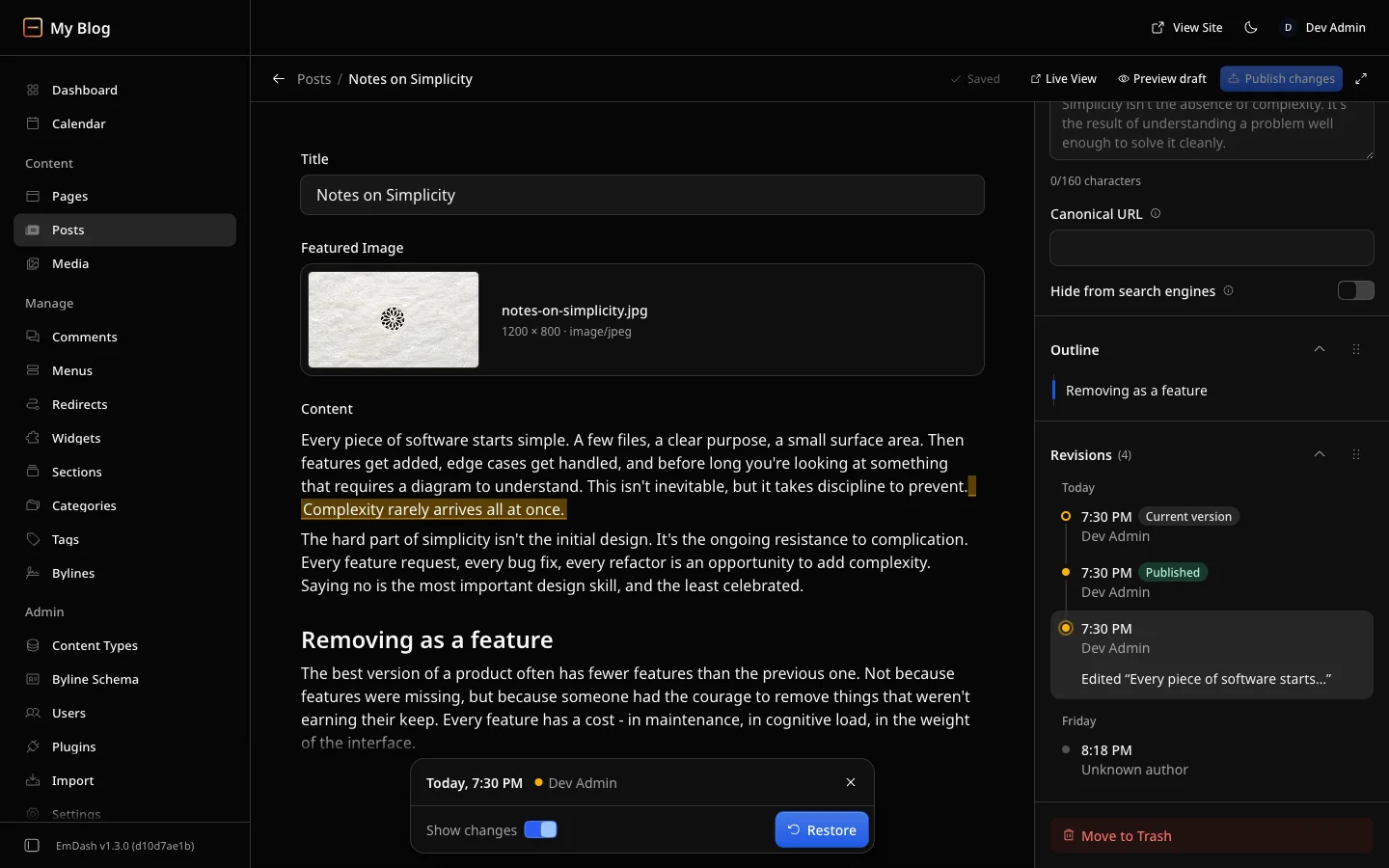
For developers: the API and the MCP tool revision_list now also return the name of whoever saved each version.
Create bylines with everything
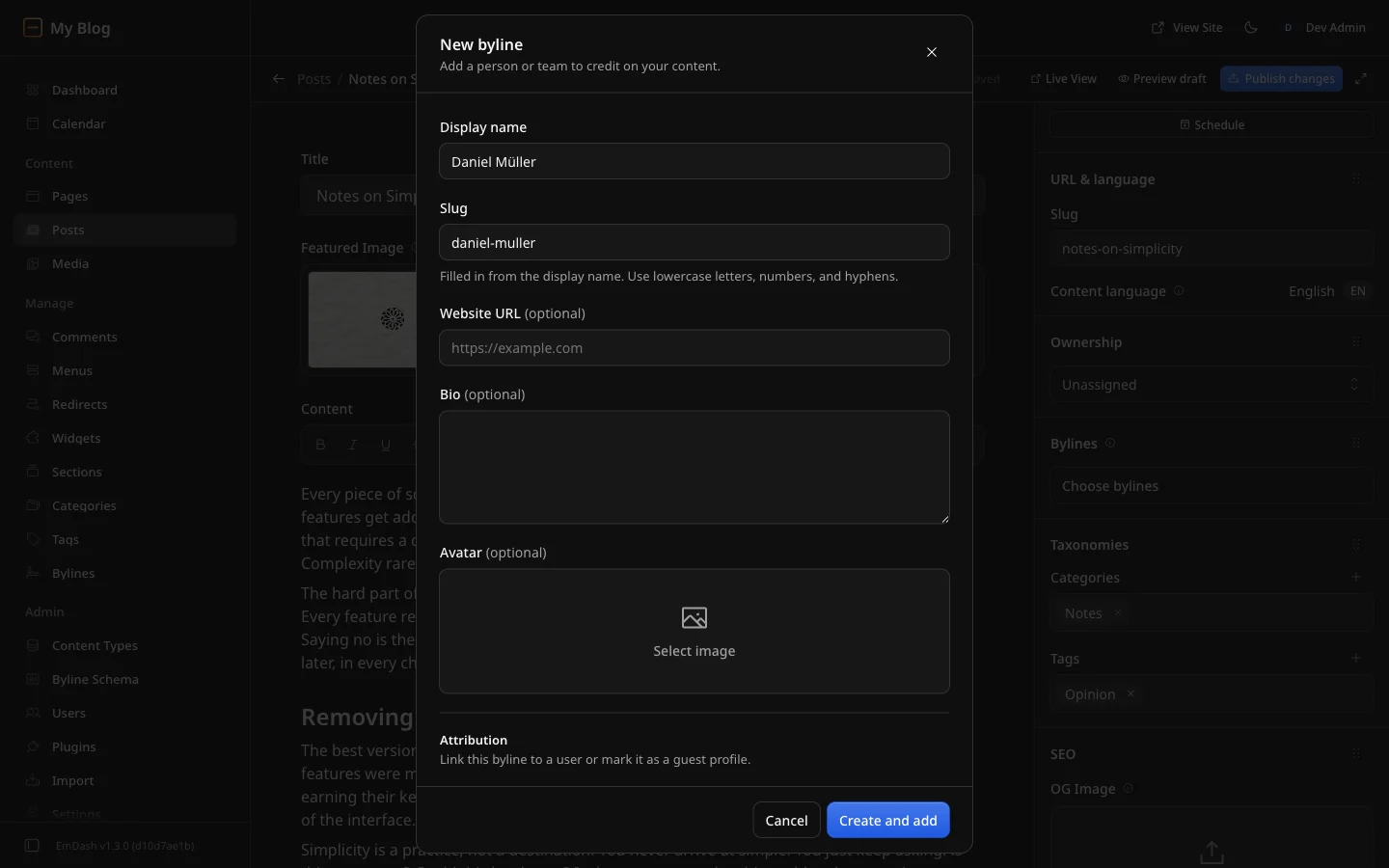
If you created a new author from the editor, you used to get a name and a slug. Now Create opens the same form as the Bylines page, with website, bio, avatar, linked user and custom fields (#4050). New bylines are no longer guest bylines unless you switch that on in the form. The Bylines page itself now tells you what's missing instead of greying out the button without explanation (#3967).
Moving from WordPress: the import brings more along
If you're moving from WordPress, 1.3 brings more of the old site across. Daniel and I wrote most of these fixes:
- ACF fields. Through the EmDash Exporter plugin, Advanced Custom Fields values now arrive in full. Every field of an ACF group becomes a field in EmDash, repeaters, groups and relationships land as JSON. Linked posts and users come across as IDs only, passwords and unrelated content stay out (#4092). How we solved this by hand so far is in our article on the ACF import.
- Internal links. Links to the old WordPress domain become relative paths, and the permalink structure stays. If your routes differ, you need redirects (#3892).
- Dynamic blocks. Blocks that WordPress only renders on request, such as Latest Posts or blocks from plugins, used to vanish without a trace. Now they stay as an HTML block with the original comment, so you can see what was there (#4055).
- Bot protection. If Cloudflare's bot protection blocks the import, EmDash now says so and explains how to let it through. Before, it only said WordPress wasn't detected (#4150).
- Smaller fixes. The XML import no longer creates collections for ACF's internal types (#4090), hosts that block requests without a user agent no longer answer with 403 (#4113), and the count of skipped entries is right (#4056).
Whether the move pays off for client projects is covered in our guide for agencies. And if you're coming from WordPress, start with EmDash for WordPress users.
Faster on Cloudflare
Less waiting on D1
Every query to D1 is a trip across the network to the database. EmDash caused some of those trips itself, and I ran into this on our own site: with session: "auto", it sent site settings, menus, widget areas and terms ahead on every page. A session runs its queries one after another, so the page's actual query waited at the back of the line. In this configuration EmDash now skips that. I wrote this PR (#3937).
Batching the queries is better still. New sites from the Cloudflare templates now do that, and for an existing site one line in astro.config.mjs is enough:
database: d1({ binding: "DB", session: "auto", coalesce: true }),Queries that start at the same time then run in a single trip. The Weekly Dash has run like this for weeks. coalesce is still experimental: if a write starts together with a read, the write can run first. Even more than the number of trips, their length counts, meaning where the database sits. We show that in D1 region and load time.
Two smaller savings come on top. If the comments fit on one page, getComments() fetches them in one query instead of two (#3907). And after a cold start, EmDash saves up to two queries when the plugin marketplace is enabled (#3584).
A cache that lasts longer
On Cloudflare, EmDash stores finished pages in the Workers Cache and deletes them as soon as something changes. In 1.2, merely creating or duplicating a draft deleted every page with a post list, even though readers see nothing of it. I found that while measuring for an article about the cache and fixed it (#4128). Publishing and corrections to published posts still empty the lists. How we use the cache on this site is in Edge caching for EmDash on Cloudflare.
- Redirects apply at once. A new redirect for a cached page used to be ignored until the copy expired (#3982, #3997).
- Saved means saved. If purging the cache failed, the admin reported an error although the change had long been saved. Now it reports success and writes the error to the log (#3987).
New templates for blog and marketing
The blog template, which The Weekly Dash grew out of, has a new design (#3951) and now follows the site's language. Page language, date format and RSS feed used to be fixed to English, so screen readers read German posts in English (#3966). The marketing template is completely new: it starts with a made-up company and photos, and everything that used to live in code you now manage in the admin (#3969). For that, the menu editor can now rename menus and give items CSS classes.
On release day, npm create emdash didn't ship the new templates yet, because it doesn't load them from the main project but from a separate repository. They were synced there on 16 October (templates#64). If you create a new site now, you get the new templates. Existing sites aren't affected, the update doesn't change how they look anyway.
Editing right on the site
Visual editing, writing directly on the finished page, lagged behind the new editor from 1.2. Now it has the same toolbar for formatting and links and the same slash menu (#4117). You insert images from the Media Library with /image and edit alt text and caption in place (#4137). Uploading doesn't work on the page, so upload new images in the admin first.
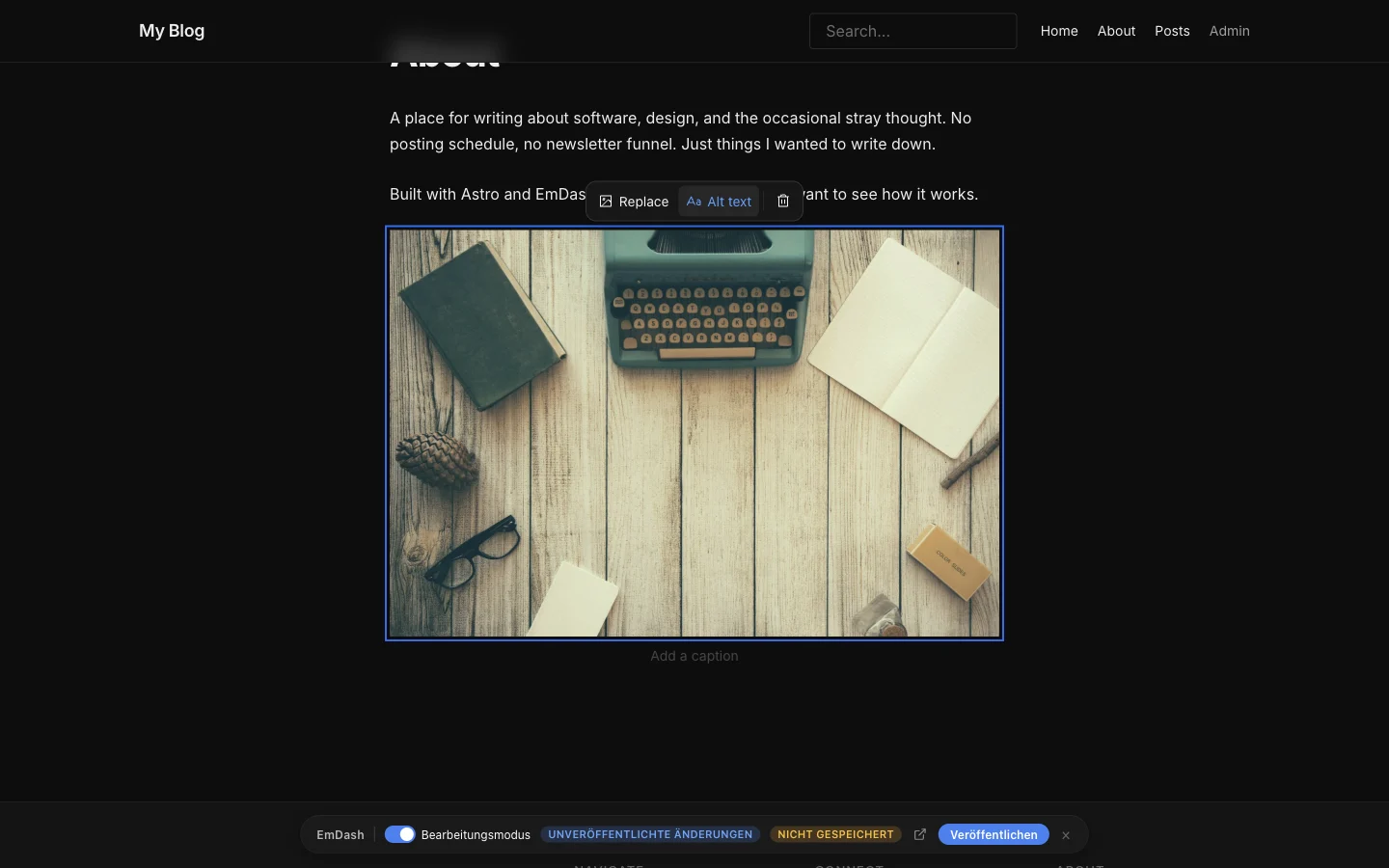
The fixes may matter more day to day: an empty field, for example in a new post, can now be edited on the page at all, and saving when you leave a field no longer creates a new revision every time (#3942). Clicking into a field no longer selects all its text, which made the first keystroke replace everything (#4014).
robots.txt: search yes, AI training no
For many sites the question right now is whether AI companies may train on their writing. EmDash 1.3 has a switch for that under Settings → SEO: Disallow AI training (#3623). I wrote this PR. When it's on, it adds the well-known training crawlers to robots.txt, among them GPTBot, ClaudeBot, Google-Extended and CCBot, plus the line Content-Signal: search=yes, ai-train=no.
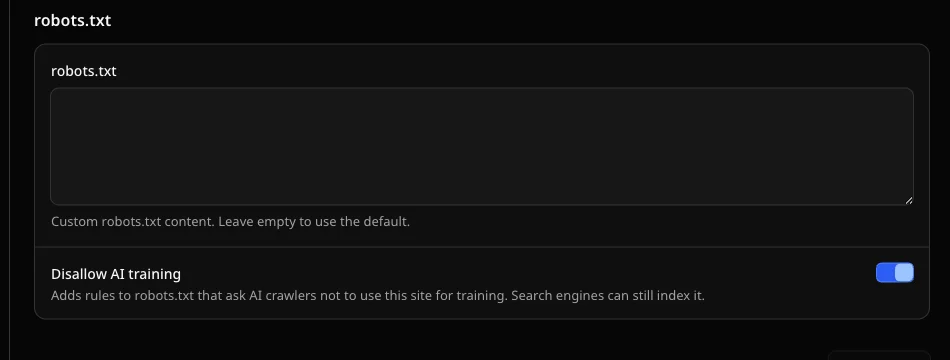
For visibility, what the switch doesn't do matters: it blocks no search engine. Google keeps finding your pages, Google-Extended only governs training. The crawlers ChatGPT uses to search for answers aren't on the list either, so you stay findable in AI answers. The switch is off until you turn it on, and it also applies to a custom robots.txt. Like everything in that file, it's a request. Reputable crawlers honour it, others don't.
Small fixes in the admin
- A cleared number field is saved as empty instead of
0, and decimals such as4.50no longer block saving (#3791). A cleared optional URL field can be saved again (#4076). - Merely opening an entry no longer creates a draft. Until now, content from MCP showed "pending changes" nobody had made (#4035).
- Tables from Google Docs with aligned or merged cells can be pasted (#4141).
- The editor's outline reliably jumps to a heading when you click it and shows where you are as you scroll (#4152).
/videoopens the Media Library first, like/image(#3936), and uploads into a Media Library folder land in that folder (#4081).- The OG image in the SEO panel shows its preview in the format social networks use (#4115).
- The first admin is signed in right after creating the passkey instead of landing on the sign-in page (#4000).
- Search finds things again when the query contains words like "and" or "or" (#3202).
For agencies, developers and AI agents
- MCP:
content_createnow acceptsseoandpublishedAt(#4102). Writes without a block field no longer fail (#3824), and blocks without_typego through when only one type is allowed (#3825). - Plugin tools over MCP: plugins with names like
@acme/calendarexpose their tools under names MCP clients accept. A tool with a broken schema no longer takes all the others down (#988). - Matching versions:
astro buildandastro devwarn whenemdashand@emdash-cms/cloudflarehave different versions and name the command that fixes it (#4058). - Stuck migration:
emdash migrate --take-over-lock <id>runs migrations under a stuck D1 lock without a Worker grabbing it in between (#4068). The date migration runs in batches on large D1 databases and resumes where it stopped after an interruption (#4072). - CLI:
emdash whoamiworks behind Cloudflare Access and doubles as a check that the site is reachable (#4034).emdash seedno longer creates media twice (#3921). - Forms plugin: the daily digest is sent again (#3979), and the same form can appear twice on a page (#3031).
The admin in more languages
Daniel completed the German admin (#4084). Only the strings of the new 1.3 features are still English there, for example in the revision history and on the AI training switch.
Croatian is new, about 99 % translated (#3934). Polish (#3970) and French (#4134) are complete, and Swedish, Hindi and Indonesian more complete. Italian has a first start but can't be selected yet (#4026). Dates now follow the admin's language everywhere instead of the browser's (#3292).
How EmDash is decided
One change you won't see in the admin affects everyone who contributes: EmDash now has written rules for governance and contributions (#3808). There's a public list of maintainers, a roadmap, feature plans for manageable projects and RFCs for bigger decisions, plus rules for code written with AI. Daniel and I are both maintainers.
Updating to EmDash 1.3: what to check first
1.3 brings no new database migration. Most changes need nothing from you, but look at these ten points before you update:
- Guest bylines: bylines you create from the editor are no longer guests automatically. If your template reads
byline.isGuest, it shows new bylines as regular authors unless you turn on Guest in the form. Existing bylines don't change (#4050). - Roles with Cloudflare Access: if you set
defaultRoleorroleMappingto 30 so people can't publish, use 20. Role 30 can publish its own posts (#4053). - Earlier ACF imports: if you already imported relationship or user fields with an older version, check those JSON fields for whole WordPress posts or users. A new import skips existing entries and doesn't correct them (#4092).
- Empty number fields: a cleared number field is now empty instead of
0. If your template calculates with the value, handle the empty case (#3791). - Empty URL fields: a cleared optional URL field is now
nullinstead of an empty string (#4076). - `where` with an object:
where: { field: { in: [...] } }never filtered and silently returned every entry. Now it logs a warning. For a list, use an array:where: { field: [...] }(#3265). - MCP names of plugins: if you stored calls to plugin tools with names like
@acme/calendar, they're now calledacme__calendar__<tool>(#988). - Plugins without a sandbox: with
sandbox: false, the site no longer starts when the plugin system can't load. Before, it silently started without marketplace plugins (#3584). - Visual editing in your own templates: in edit mode, an empty Portable Text field is now an empty array instead of
null(#3942). - Custom admin with `ContentEditor`: the
onRevisionRestoredcallback may now return a promise. If your admin doesn't readitemfrom the entry'scontentquery, reload it in the callback (#4136).
How to update to EmDash 1.3
An update is a deployment: you raise the packages in the project and put the site online again. Your content stays in the database. The easiest way is upgrade-emdash:
npx upgrade-emdash@latest
npm run deploy
I tried this on a copy of our test site with the blog template for Cloudflare. The dry run with --dry-run reported two packages going from 1.2.0 to 1.3.0 and 48 changelog entries. The real update took 31 seconds, brought no new migration, and the build ran without errors afterwards. All seven posts were still there. New: the command also puts six skills for AI agents into .agents/skills, one of them for updating itself. The file .emdash/UPGRADE.md with all changes is meant as a work order for you or an agent.
You can still do it by hand, on a site from the Cloudflare template with two commands:
npm install emdash@latest @emdash-cms/cloudflare@latest
npm run deploy
Keep emdash and @emdash-cms/cloudflare on the same version, from 1.3 on the build warns otherwise. On Cloudflare every deploy starts with an empty cache, so don't schedule the update right before a post many readers are waiting for.
How to set a restore point first and get back in an emergency, I show step by step in Update EmDash.
What about you?
Do you work on an EmDash site with several people, or are you moving from WordPress right now? What helps you most in 1.3, and where does it still get stuck? Tell us in the comments below. Daniel and I are both EmDash maintainers and read along: what you report here goes straight into the project.
Changes to this article
- : Updated the note on templates: since 16 October, npm create emdash ships the new templates.

Comments
First-time comments appear once we've approved them. How we handle your details