Tested with EmDash 1.1.0, WordPress 7.1.2, Secure Custom Fields 6.9.5 and the exporter plugin 1.0.0 on 5 October 2026.
Case studies with key figures, team pages with portraits, projects with image galleries: on client sites, the content that really matters often doesn't live in the editor but in ACF fields. When you move a site to EmDash, those fields decide how much work is waiting for you.
When I imported a typical agency site for the guide for agencies, my first reaction was relief. Every ACF value had arrived, nothing was missing. The second look was sobering: two repeaters had been split into 20 single fields, images were nothing but old WordPress IDs, and the launch date read 20250115. No frontend can do anything with that.
In the guide I recommended a dedicated import script for this. Since I work on EmDash's WordPress import myself, I wanted to know how much work that really is and where it gets stuck. So I wrote the script for our test site. It's just under 270 lines, and at the end the case studies in the admin looked as if WordPress had never been involved. A few things are still manual work, more on that at the end.
The test site
I used the same site as in the guide: a custom post type referenz (German for case study) with twelve entries and a field group like the ones I know from client projects. It has key figures and an image gallery as repeaters, a logo, related posts, a launch date, a WYSIWYG field, a toggle for featured case studies and a flexible content field. I imported it with the exporter plugin, because that's the only route that brings ACF fields along at all.
Instead of ACF Pro, the test site runs Secure Custom Fields, the free fork on WordPress.org that includes repeaters and flexible content. Both store their values the same way, so everything here applies to ACF Pro as well.
What EmDash holds after the import
This is a case study after the import, cut down to the ACF fields. The field names are German: kennzahlen are the key figures, galerie the gallery, verwandt the related posts and beschreibung the description.
{
	"kennzahlen": 2,
	"kennzahlen_0_label": "Besucher",
	"kennzahlen_0_wert": "+40%",
	"kennzahlen_1_label": "Ladezeit",
	"kennzahlen_1_wert": "0,8 s",
	"galerie": 2,
	"galerie_0_bild": 1692,
	"galerie_0_text": "<p>Bild <strong>eins</strong></p>",
	"logo": 1687,
	"verwandt": [1, 163],
	"launch": 20250115,
	"featured": 1,
	"beschreibung": "<p>WYSIWYG <em>Text</em> 1</p>…"
}
If you've ever looked into the wp_postmeta table, you'll recognise this straight away. That's exactly how ACF stores the values in WordPress, and the importer takes them over one to one. Every key becomes a field of its own in EmDash. If a single case study has five key figures, the whole collection gets ten fields for them. On our test site it ended up with 29.
![At the top the ACF repeater field “Kennzahlen” (key figures) on a case study in WordPress with two rows, Besucher +40% and Ladezeit 0.8 s. Below it the same case study in EmDash with flexible content as JSON, the logo as the number 1687, related entries as [1, 163], the description as HTML and the repeater split into single fields such as “Kennzahlen 0 Label”.](/_image?href=https%3A%2F%2Ftheweeklydash.com%2F_emdash%2Fapi%2Fmedia%2Ffile%2F01M46PFH5BXQHNCTVYJ8PVYAW6.png&w=2030&h=2492&f=webp&fit=cover&position=center)
EmDash has a matching field for every ACF type, the import just doesn't use it:
ACF field | After the import | Matching EmDash field |
|---|---|---|
Repeater | A count plus one field per row and cell |
|
Image | WordPress ID as a number |
|
Relationship | List of WordPress IDs as JSON |
|
Date | Number like |
|
True / False | Number |
|
WYSIWYG | HTML as text |
|
Flexible content | JSON, and split up on top of that |
|
Two things only struck me while building, and neither has anything to do with ACF. Titles and descriptions from Yoast end up as ordinary fields seo_title and seo_description instead of in EmDash's SEO panel. And the featured image does point to a file in the site's own media library, but it's stored as an external image, without a link to it.
For the date I decided against the datetime field type. EmDash converts every value there to UTC, and a launch on 15 January can quickly turn into the 14th. That's why the field type docs recommend a text field for a plain calendar date. In the format YYYY-MM-DD it still sorts correctly.
My script in three steps
I wanted something I could run as often as I like during a real move, so I split the script into three commands. schema creates the new fields and turns on the SEO panel for the collection. data reads every case study, converts the values and publishes it again. cleanup deletes the old fields, but only once I've looked at the result. You'll find the whole script as a gist on GitHub.
The new fields need names of their own, because kennzahlen and logo already exist, just with the wrong type. I called them kennzahlen_liste, galerie_bilder, logo_bild, verwandte, launch_datum, beschreibung_text and hervorgehoben. It isn't pretty. If your frontend doesn't exist yet, it doesn't matter, and otherwise it's best to plan the new names in from the start.
The script talks to EmDash's REST API. For that you need an API token from the admin with the scopes content:read, content:write, schema:read, schema:write and media:read. It asks WordPress about the old IDs, so the old site has to be still running. And because it creates and deletes fields, run it against a copy first. I backed up the test site's database beforehand and was glad I did, as you'll see in a moment.
Rebuilding the repeaters
This was the easiest part. The count and the numbered fields turn back into rows:
// ACF stores a repeater as a row count plus one key per cell: galerie = 2,
// galerie_0_bild, galerie_0_text, galerie_1_bild, ...
function rows(data, name, cells) {
	const count = Number(data[name] ?? 0);
	return Array.from({ length: count }, (_, i) =>
		Object.fromEntries(cells.map((cell) => [cell, data[`${name}_${i}_${cell}`] ?? null])),
	);
}
The script creates the new field like this:
{
	slug: "kennzahlen_liste",
	label: "Kennzahlen",
	type: "repeater",
	validation: {
		subFields: [
			{ slug: "label", type: "string", label: "Label" },
			{ slug: "wert", type: "string", label: "Wert" },
		],
	},
}
The gallery is where I hit the first limit. An EmDash repeater only takes simple fields such as text, number, yes/no, date, select, URL and image, but no formatted text. The image captions were small WYSIWYG fields in ACF; in the repeater only the plain text survives. “Bild eins” becomes “Bild eins”. For captions I can live with that, for longer texts I'd cut the fields differently.
Finding images by their content
This is where I had to think longest. The importer copied every image into EmDash's media library, but the field still holds the WordPress ID. There's no list of which old ID belongs to which new image. Going by the file name felt too risky to me, because every grown client site has a second logo.png lying around somewhere.
What's unique is the content of the file. EmDash stores a SHA-1 checksum for every image. The script downloads the original through the WordPress API, computes the same checksum and uses it to find the matching image:
const attachment = await wp(`/media/${wpId}`);
const file = Buffer.from(await (await fetch(attachment.source_url)).arrayBuffer());
const hash = `sha1:${createHash("sha1").update(file).digest("hex")}`;
const item = media.byHash.get(hash);
Across the twelve case studies, that matched every logo and every gallery image on the first try. If the script can't find an image, it prints a warning and leaves the field empty. Better an empty field that someone notices than the wrong logo on a client's case study.
The featured image was easier, because it already holds the path into the site's own media library. The script looks up the image for it and links it properly.
Related posts
The relationship field holds WordPress IDs like [1, 163]. WordPress's search API tells you the post type and the address for every ID, and that's how the script gets to the slug. After the import, the post sits under the same slug in EmDash. In EmDash this becomes a reference field:
{
	slug: "verwandte",
	label: "Verwandte Beiträge",
	type: "reference",
	validation: { targetCollection: "posts", multiple: true },
}
A reference field always points to exactly one collection, though. In ACF a relationship can mix posts, pages and custom types. Our test data only had posts. If your fields are mixed, you need one reference field per target or have to settle on one. The script reports every reference it can't match.
By the way, you don't write references into the entry's data but next to it, as a list of EmDash IDs per field (REST API). EmDash saves them in the same transaction as the entry.
Save, and then publish again
The rest was diligent work. 20250115 becomes 2025-01-15, 1 becomes true, and the HTML from the WYSIWYG field is converted by htmlToPortableText from the official package `@emdash-cms/gutenberg-to-portable-text`. That's the same converter EmDash uses for the content during the import.
After the first run I thought I was done. In the admin all the new fields were filled, everything looked right. Then I looked at the published version, and it still had the old data. On a published entry, a change through the API first lands in a draft, just like when an editor changes something in the admin and hasn't clicked Publish yet. That makes sense, I just hadn't thought of it.
Since then the script publishes every case study again that was published before:
const updated = await emdash(`/content/${COLLECTION}/${item.id}`, {
	method: "PUT",
	body: JSON.stringify({ data, references, seo, _rev }),
});
// On a published entry the update lands in a draft revision. Publish it
// again, but leave drafts as drafts.
if (item.status === "published") {
	await emdash(`/content/${COLLECTION}/${item.id}/publish`, {
		method: "POST",
		body: JSON.stringify({ _rev: updated._rev }),
	});
}
Drafts stay drafts, and the original publication date from WordPress is kept. _rev is the revision you get when you read the entry. If someone changed the entry in the meantime, EmDash refuses to save instead of overwriting their change.
The second stumbling block came with the cleanup. After cleanup the old fields are gone, and another run of data would have overwritten the new fields with empty values. When you rehearse a move several times, that happens quickly. Now the script recognises case studies it has already converted and leaves them alone. To test that properly, I restored the backed-up database and ran everything again from the start.
What it looks like now
After the run, the key figures are a repeater with two rows, the logo is an image from the media library, and the related posts can be clicked and reordered. Title and description from Yoast sit in the SEO panel, where they belong. With cleanup I then deleted 20 old fields; the collection now has 18 instead of 29.
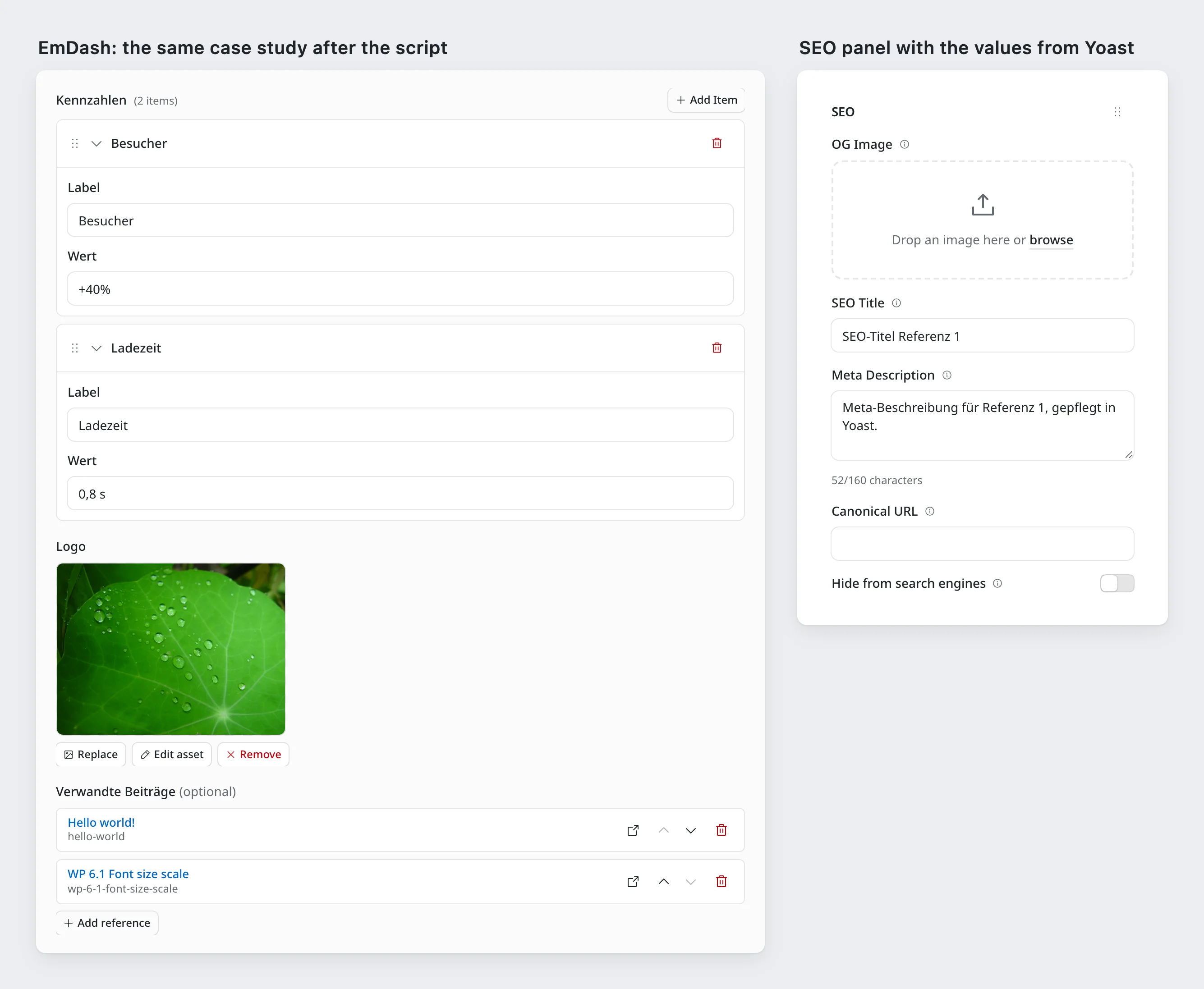
What surprised me is how little of the script has to do with EmDash itself. The REST API gave me everything I needed. Most of the work goes into resolving the old WordPress IDs and deciding what the fields in EmDash should be called and look like.
What's still manual work
I deliberately left the flexible content field sections alone. It arrives as clean JSON with the layout for each section; the script only deletes the split copies next to it. EmDash has the blocks field type for this, which needs block types of its own, and that's a topic for a separate article. Until then, the images in it are still WordPress IDs.
EmDash doesn't know conditional fields or options pages. You could put the values from an options page into a collection of its own with a single entry, for example. And then there's the frontend: you have to use the new field names in your templates, render images with <Image image={...} /> from emdash/ui, and fetch references with getEmDashReferences().
Conclusion
The WordPress import doesn't lose any ACF data, it just stores it the way WordPress does. That's annoying, but it can be fixed, with manageable effort and without typing a single value by hand. Really, this belongs in the importer itself. Until it's there, I'd plan a script like this into every move involving ACF and run it from the start: first against a copy, then with every rehearsal, and one last time on the day you switch over.
What else to watch out for when moving from WordPress is in the guide for agencies. And if you have ACF fields where this approach doesn't work, tell me in the comments. I'm especially curious how you've handled flexible content.

Comments
No comments yet
First-time comments appear once we've approved them. How we handle your details