Tested with EmDash 1.2.0 and 1.3.1 on a demo site and with the measurements from theweeklydash.com, from 11 to 21 October 2026.
One word. That's all I had changed in the excerpt of a single post. For the next two hours, the whole EmDash site on Cloudflare was slow, from Switzerland to Singapore, including every article I had never touched. Where there had been 50 milliseconds, there were now two seconds.
The usual suspect is the cold start on Cloudflare Workers. At most, it's an accomplice. The culprit is an empty cache, and EmDash empties it more thoroughly than you'd think. How that happens, how long the cache lasts without visitors and what helps: measured, not guessed.
The site was a demo we deliberately left unprotected for a series of measurements across several EmDash sites, so that we'd end up with usable numbers instead of gut feeling. It ran for two days without any help, and Globalping requested it every 30 minutes from Germany, Switzerland, the UK, the US, Singapore and Brazil. After that, it ran with a warmer that requests the pages before readers arrive. Finally, I updated it to EmDash 1.3.1, turned on the cache across deploys and measured for another two days.
For context: this warmer is called warmup.rocks, and it's my own commercial service. I built it because I saw the cache problem early, mainly for myself and my clients. The Weekly Dash is warmed with it too. I'm also a maintainer of EmDash, and every site in this article runs on Cloudflare Workers, including linguadash.dev. That's the site of LinguaDash, my free plugin that makes EmDash sites multilingual.
Cold start or cold cache?
The two terms sound alike and mean different things. On a cold start, Cloudflare first has to load the Worker, compile it and run it once before it can answer. That has become rare: according to Cloudflare, 99.99% of requests now hit a Worker that is already warm, measured on Enterprise traffic. With a cold cache, the Worker has long been running, but the finished page isn't ready. EmDash has to build it again and query the database to do so. If you're coming from WordPress, you know the feeling: a cold cache behaves like a poorly cached WordPress site that assembles every request fresh from PHP and the database. Only here, a Worker and D1 do the work.
On a site with few visitors, the two come together, and linguadash.dev lets you take them apart. From the cache, a page arrived in 47 to 65 milliseconds. When EmDash had to rebuild it and the Worker was already running, it took 326 milliseconds. When the Worker wasn't running yet, it took 1.5 and 2.0 seconds, and around 900 milliseconds of that passed before EmDash even started. That's the actual cold start. A cache hit saves you both.
How the Workers Cache works
On Cloudflare, EmDash uses the Workers Cache, and it belongs to the Worker, not the domain. That's why Cache Rules, Page Rules and every other cache setting in the dashboard have no effect on it. It's controlled only by the headers a page sends. How we set them on The Weekly Dash is in Edge caching for EmDash on Cloudflare. The cache is tiered: every data center has its own cache, with a shared tier above them.
If you're coming from WordPress behind Cloudflare, you know a safety net. A Cache Rule makes the HTML cacheable, and Cache Reserve keeps pages in central storage for up to 30 days after the last request, even when the data centers have long evicted them. For EmDash in a Worker, that net doesn't exist. Once a page drops out of the data center and the shared tier, the Worker builds it again.
A page only lands in the cache once it has been served. You can't prewarm it; Cloudflare says so explicitly in the limitations of the service. It gets emptied in two ways. Every deploy starts from scratch, because the Worker's version is part of the cache key, unless you turn on cache.cross_version_cache. And when you publish, EmDash deletes pages by tag. On top of that, Cloudflare may evict rarely requested pages earlier than their lifetime would allow. The configured time is a ceiling, not a promise.
On the demo, a page stays fresh for five minutes. After that, Cloudflare may serve the old copy for up to a week and renew it in the background. That's stale-while-revalidate, and the header then says UPDATING. In that case, the reader doesn't wait.
When the cache goes cold
Three things empty the cache of an EmDash site: a deploy, publishing and silence. The first is to be expected, the second hits far more pages than you'd think, and the third is rarer than feared, but not predictable.
After a deploy, everything starts over
Without cross_version_cache, every new version of the Worker gets an empty cache, including the one after an EmDash update. The start of the measurements already showed what that feels like: the last deploy was a good two hours earlier, and the demo had had hardly any visitors for two days. Of 36 first requests, one per page and country, 28 were a MISS. The median time to first byte was 1.7 seconds, and one request in ten took more than 5 seconds. From the cache, it would have been around 50 milliseconds. When I updated the demo to EmDash 1.3.1, I measured this on purpose. Shortly before the deploy, 31 of 36 requests from six countries arrived in under 200 ms, with a median of 68 ms. Two seconds after the deploy, it was 4 of 36, with a median of 1.3 seconds. Most requests with a HIT waited too, because they depended on the same rebuild.
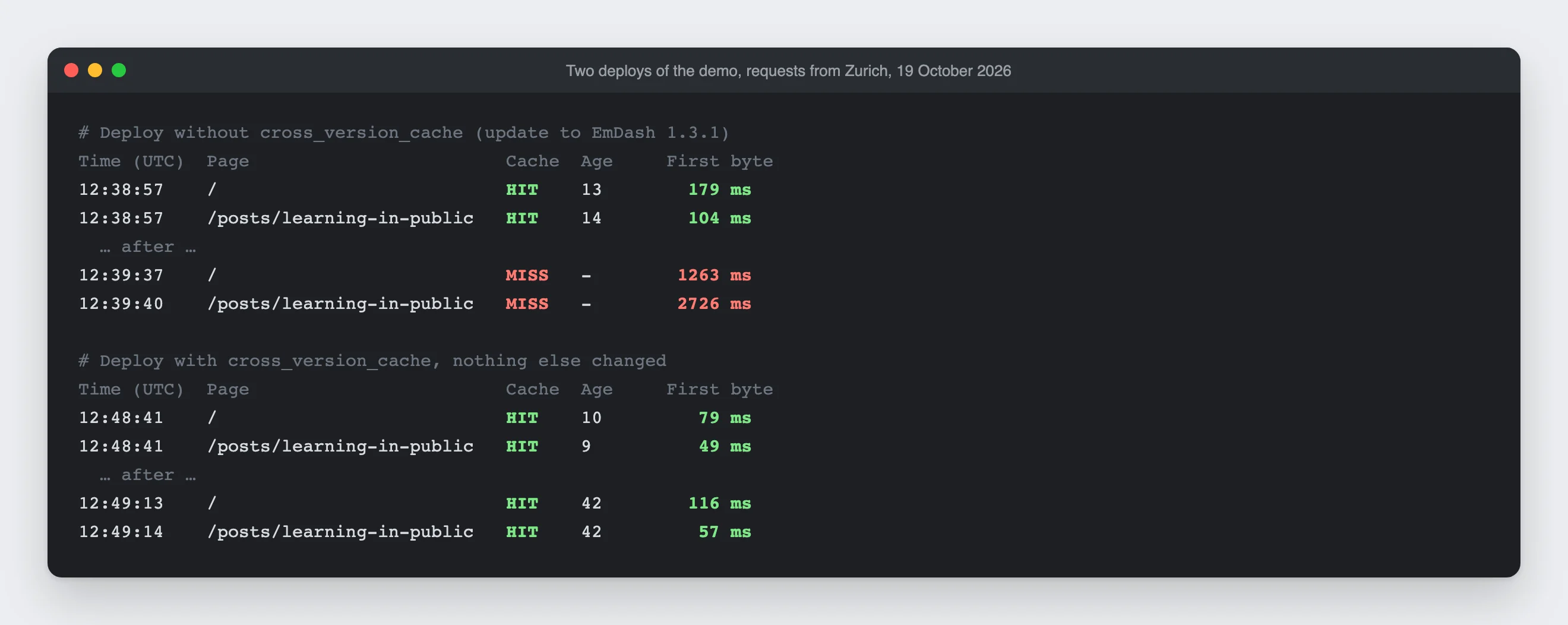
On theweeklydash.com, the warmer's data shows the same thing. After the deploys on 7 and 8 October 2026, no data center served a copy older than the deploy. Many data centers did report a HIT afterwards, but with a copy created at the same moment as the first MISS. So not everyone pays the price, only the first request. It builds the page, and the others probably get it through the shared tier. The same happens with every purge: on scllauerz.ch, the EmDash site of a sports club, a cron job updates the calendar every night shortly after midnight and deletes every page in the process. The warmer's data shows the same pattern there 30 times.
One post changed, the whole site cold
That's the scene from the beginning. At 08:00 Swiss time, I republished a single post on the demo, with one changed word in the excerpt. In the two hours that followed, every one of the 25 measurements in Switzerland, the UK, the US, Singapore and Brazil was a MISS, with 0.3 to 2.1 seconds to first byte. Not just on the changed post, but on every page measured, including articles I hadn't touched.
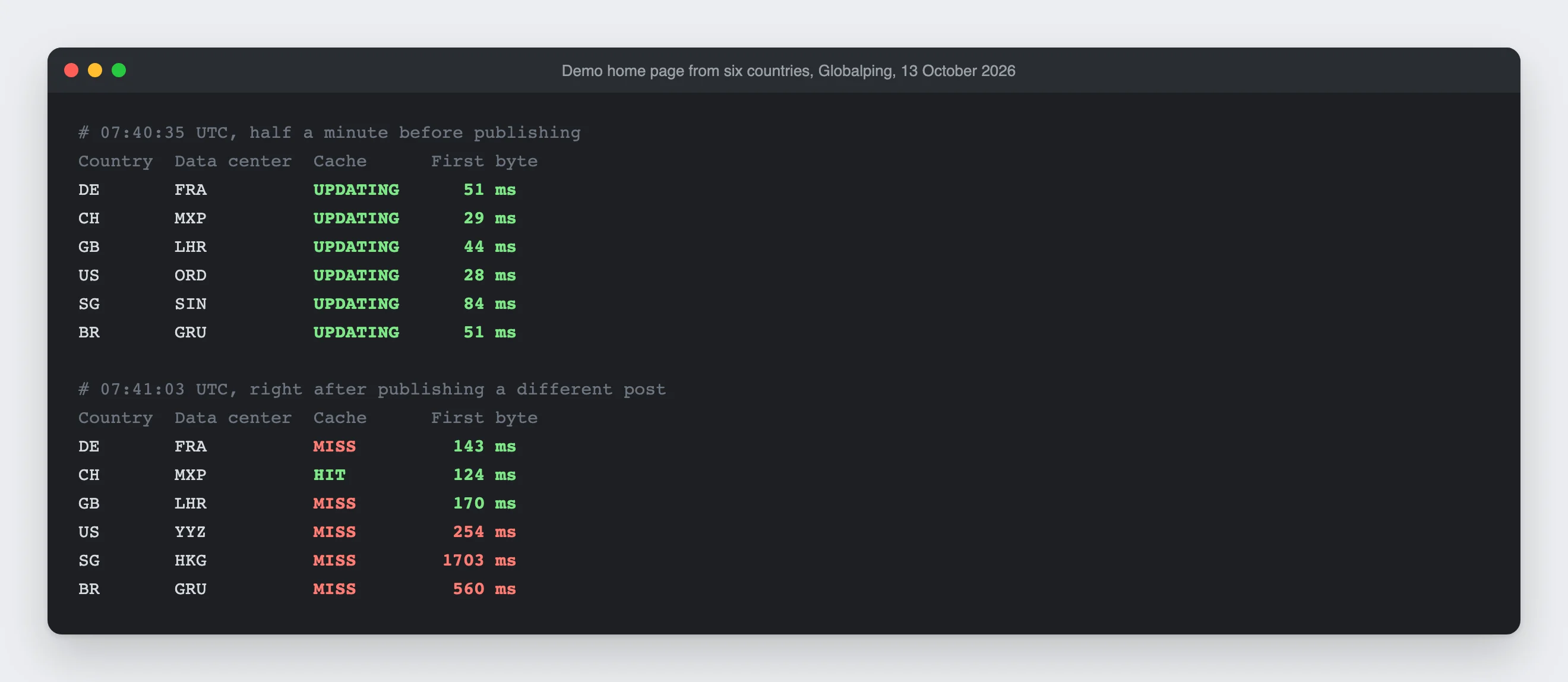
The explanation is in the code. When you publish, EmDash 1.2 deletes everything carrying the collection's tag, here posts. Every page that shows a list of posts gets that tag. In the official blog and blog-cloudflare templates, that's every single article, because each one shows the latest posts underneath. One word in an excerpt empties the cache of every article, in every language and in every data center. And the Astro adapter deletes hard: instead of only marking the copies as stale, so readers would get the old version while the new one is built in the background, it throws them away. EmDash 1.3 hasn't changed that, and cross_version_cache doesn't help here, because it only concerns deploys. On 1.3.1, on 20 October, none of 12 measurements in the first hour after publishing was fast.
A day later, I repeated the test. Half a minute before publishing, the home page came from the cache in all six countries measured, in 28 to 84 milliseconds. Right after, it was a MISS in five of them, with 1.7 seconds to first byte in Singapore.
What nobody requests lasts longer than expected, but not reliably
The third cause is the quietest. Cloudflare may evict rarely requested pages long before their configured lifetime runs out, and doesn't say when. So I measured it: one page of the demo was requested once from 47 locations and then left alone. Later, each location sent exactly one check request, after 10 minutes, 1, 3, 6, 12 and 24 hours, each with its own URL.
The result is better than feared. After 24 hours without a visit, the copy was still there in 40 of 42 data centers and arrived immediately. In a second series, Frankfurt and Milan also kept it for a whole day, and in Geneva, linguadash.dev still served a copy after around 44 hours.
In the whole measurement, the copy was really gone only once, after 24 hours in San José. Reliably fast it still wasn't, for a different reason. Six times, a check request was slow even though the copy was there. Each time, two locations had landed in the same data center in the same second, such as Bangkok and Singapore in Singapore. One got the old copy right away, which started the rebuild. The other only got the new version and waited just under 1 to 14.8 seconds for it. So if you hit an expired copy at the same time as another visitor, you may wait as if it were a MISS. That's how I read the data; I didn't test it specifically. One caveat: the page was filled from 47 locations, so the shared tiers were full. A page only a single reader has opened probably drops out sooner, and the demo has seven articles and hardly any traffic.
And when the copy is still there
Once a page has been visited, stale-while-revalidate helps. Of 101 return visits three hours apart, 84 came straight from the cache, with a median of 48 milliseconds, even though the copy was long past fresh. 13 came back as EXPIRED, with a median of 1.6 seconds. So the copy was there, and Cloudflare still made the reader wait until the new version was built. Why it doesn't choose UPDATING in those cases, I couldn't find out. There is a pattern, though: of the 34 EXPIRED without a warmer, 22 came from the US, 8 from Switzerland and 4 from the UK, none from Germany, Singapore or Brazil. In the US and Switzerland, the measurements alternated between different data centers; in the other three countries, they almost always landed in the same one. So EXPIRED mostly hit data centers that hadn't loaded the page themselves.
What this means for Google and ChatGPT
Readers aren't the only ones who hit cold pages. Search engines and AI services request pages regularly, and especially the ones hardly anyone else visits: old articles, sections, the third page of a list. Those are exactly the pages that stay cold after a deploy or publishing until someone comes by, and often that's the crawler. It then waits as long as a reader, one to two seconds, five at worst.
Google is open about what follows. If response times and time to first byte stay stable, Googlebot opens more connections. If a site slows down, it crawls less (crawl budget). According to Google, though, you only need to care about this on large sites, roughly from 10,000 pages with new content every day. A blog with a few dozen articles is hardly affected. Speed doesn't feed into rankings through the crawler anyway, but through the Core Web Vitals, which Chrome measures for real visitors. There, every reader who hits a MISS counts.
For AI services, less is known. OpenAI distinguishes three bots: GPTBot collects training data, OAI-SearchBot builds the search index, and ChatGPT-User fetches a page when someone asks for it in ChatGPT. How long these bots wait for an answer before giving up isn't documented by OpenAI, and I haven't measured it. In theory, then, a cold page needs its two seconds exactly when ChatGPT fetches it for an answer.
What a warmer brings
Two days each on the demo, without the hours after publishing | No warmer, EmDash 1.2 | Warmer, EmDash 1.2 | Warmer, EmDash 1.3.1 and |
|---|---|---|---|
First byte in under 200 ms | 370 of 478 (77%) | 435 of 466 (93%) | 449 of 478 (94%) |
Longer than one second | 87 | 11 | 12 |
Median | 66 ms | 66 ms | 59 ms |
- More fast responses: Two days each without and with a warmer, the same six locations, the same six pages. I leave out the hours after publishing at 06:00 UTC here. Without a warmer, the first byte arrived in under 200 ms in 370 of 478 measurements (77%); with a warmer, in 435 of 466 (93%). The US gained the most: 45 of 80 without, 71 of 84 with a warmer.
- Fewer outliers: The median was 66 ms in both phases. The difference lies in the slow requests: without a warmer, 87 measurements took longer than a second, the slowest 5.3 seconds. With a warmer, there were 11, the slowest 2.3 seconds.
- Publishing with a warmer: Publishing emptied the measured pages, and almost every first request afterwards was a MISS. The warmer ran every two hours and only came by again about 90 minutes later. Until then, 0 of 24 measurements were fast on 15 October and 4 of 24 on 16 October. After its pass, it was 8 of 12 and 10 of 12. So a scheduled warmer only helps with publishing from its next pass on. How much that gap matters showed two mornings in a row a few days later. On 20 October, the warmer came 102 minutes after publishing, and until then none of 24 measurements was fast. On 21 October, it came after just four minutes, and in the same time 16 of 24 were fast. A warmer triggered by publishing itself would be better. I haven't measured that.
- On EmDash 1.3 too: Two more days with a warmer, now on 1.3.1 and with
cross_version_cache, gave the same picture as on 1.2; see the last column. There was no deploy in those two days, so the setting couldn't contribute anything here. - With real readers: On theweeklydash.com, in the two days before warmup.rocks started, 443 of 894 page views came from the cache (50%); in the two days after, 768 of 968 (79%). I only counted HTML with status 200, without bots and without the warmer. It isn't a clean comparison, because we deployed and published several times in the same period.
- What the warmth costs: In the same comparison, D1 read queries rose from 215,000 to 482,000 in two days, and the median CPU time per request from 13 to 43 ms. Almost every additional render happens for the warmer, not for readers.
Conclusion: what helps against a cold cache
An EmDash site on Cloudflare is slow almost only when a page isn't in the cache. That happens after every deploy, after every publish and for pages nobody has opened in a while. When it's in the cache, it arrives in under 100 ms, even if the copy is stale. That leads to five tips, the first four without a warmer.
1. Set a long stale-while-revalidate. For us, that means five minutes fresh and serving the old copy for a week. In Astro, that's one line per route: { maxAge: 300, swr: 604800 }. With it, 84 of 101 return visits on the demo arrived immediately. Important: no must-revalidate in the CDN header, or every reader waits once the copy expires.
2. Keep the cache across deploys. With "cache": { "enabled": true, "cross_version_cache": true } in the Wrangler configuration, a deploy no longer starts with an empty cache (cross-version caching). The price: a layout change only appears once the pages expire or you delete them. On the demo, it worked: after a deploy with this setting, 29 of 30 requests still came from the cache, 28 of them in under 200 ms, with a median of 66 ms. Without the setting, it was 4 of 36 after the update. The first deploy that turns the setting on still starts empty itself, though. Only from the next one on do the versions share the cache. Against the purge on publishing, the setting doesn't help.
3. Show post lists only where you need them. Every page with a post list is deleted when you publish. A "Latest posts" box under every article means every publish empties every article. That also applies to corrections to an existing post and to scheduling. In EmDash 1.2, even a new draft and duplicating a post empty all lists, although readers see nothing of either. I found that while researching this article and fixed it; the fix ships in EmDash 1.3. If you correct a lot, collect the corrections and save once.
4. Make a miss cheaper. A miss costs a render with database queries. Every query that runs after another instead of alongside it makes it longer. On linguadash.dev, a render with a running Worker took 326 ms, with a cold Worker 1.5 to 2 seconds. Fewer queries and a Worker close to the database (Placement) push both down. And the database belongs close to the readers: if D1 sits in North America and most readers are in Europe, every query costs around 140 ms.
5. Use a warmer. Cloudflare can't prewarm the cache; a page is only in the cache after someone has requested it. A warmer requests the pages after every deploy and publish, before a reader does, and keeps rarely visited pages in the cache. In WordPress, you know this as the preload of a cache plugin, except that here every data center needs it separately. On the demo, with a warmer, 93 instead of 77 percent of requests arrived in under 200 ms, and there were 11 instead of 87 requests over one second. That has a cost: more database queries and more compute time, on theweeklydash.com about twice as many read queries. And a warmer helps almost only the data centers it requests from. In a test, I requested a new URL once from Zurich and a minute later from 19 countries: afterwards, the warmed copy was only in Milan, where the request had landed, and in Frankfurt. In the same test from Singapore, it helped no other data center, not even Tokyo, Sydney or Mumbai. That's less than Cloudflare promises: according to the docs, the first request anywhere in the world fills the shared tier, and from then on every data center can be served from there. In my two runs, the copy helped one neighbor at most. That's why warmup.rocks requests from 38 countries and directly from Switzerland, which reached 29 to 36 data centers per pass on the demo, 55 in total over a week. Cloudflare is present in 348 cities. Where the warmer doesn't reach, the first reader pays.
What doesn't help: Cache Rules, Page Rules, Cache Reserve and Smart Tiered Cache in the Cloudflare dashboard. They apply to the domain's cache, not the Worker's, as Cloudflare explicitly lists in the limitations of the Workers Cache. The Workers Cache is tiered anyway, automatically and without a switch.
In the end, it's less a question of technology than of habit. If you know that every publish and every deploy empties the cache, you plan both differently, and then an EmDash site on Cloudflare is almost always as fast as it can be.

Comments
First-time comments appear once we've approved them. How we handle your details