Tested with EmDash 1.2.0 and the update from 1.1.0, using the blog template for Cloudflare, Astro 7.3.6 and Node.js 22. The screenshots come from a preview build shortly before the release.
Less than a week after 1.1.0, EmDash 1.2 is here. That pace has a reason: since the last release, more and more people are using EmDash for real. They trip over bugs, report them, send translations and often build the fix themselves. That's how 128 pull requests came together in less than a week, from 24 people and one bot. 51 of them are from Daniel and me, and most of the rest comes from the community. This is exactly how an open source CMS should feel.
You notice the result as soon as you open a post. The editor is no longer a form with a text box in it but a writing surface: title at the top, text below, a slash for every block. You drag videos straight into the text. A site moves to a new domain without leaving everyone unable to sign in. And a crafted alt text can no longer run scripts in your editors' browsers.
We'll tell you what matters day to day, what you get out of it and which nine things to check before you update. New to EmDash? Start with our getting started guide and come back here afterwards.
EmDash 1.2 at a glance
- The editor becomes a page. A new bar at the top, a grouped slash menu, handles on every block and a distraction-free mode with Publish and Live View.
- Video right in the text. A new video block uploads videos to the Media Library and plays them on the site, Safari included.
- Domain changes in the admin. EmDash checks the new domain, emails every user and helps them add a passkey for the new address.
- A security fix. Content could inject scripts through the editor toolbar. That alone is reason enough to update.
- Lots of polish for Cloudflare. Fewer database queries, less CPU time on the free plan and writes that no longer get cut off.
- A more thorough WordPress import. Tables, scheduled posts, buttons and media links now come across properly.
The new editor in EmDash 1.2
The biggest visible change is where editors spend their whole day. The content editor is now laid out as a page (#3710). The title sits at the top as a large heading, the text below it without a frame. One bar above the page holds the way back to the list, the entry's title, the save status, Live View, Preview and Publish. Distraction-free mode adds Discard changes and Schedule.
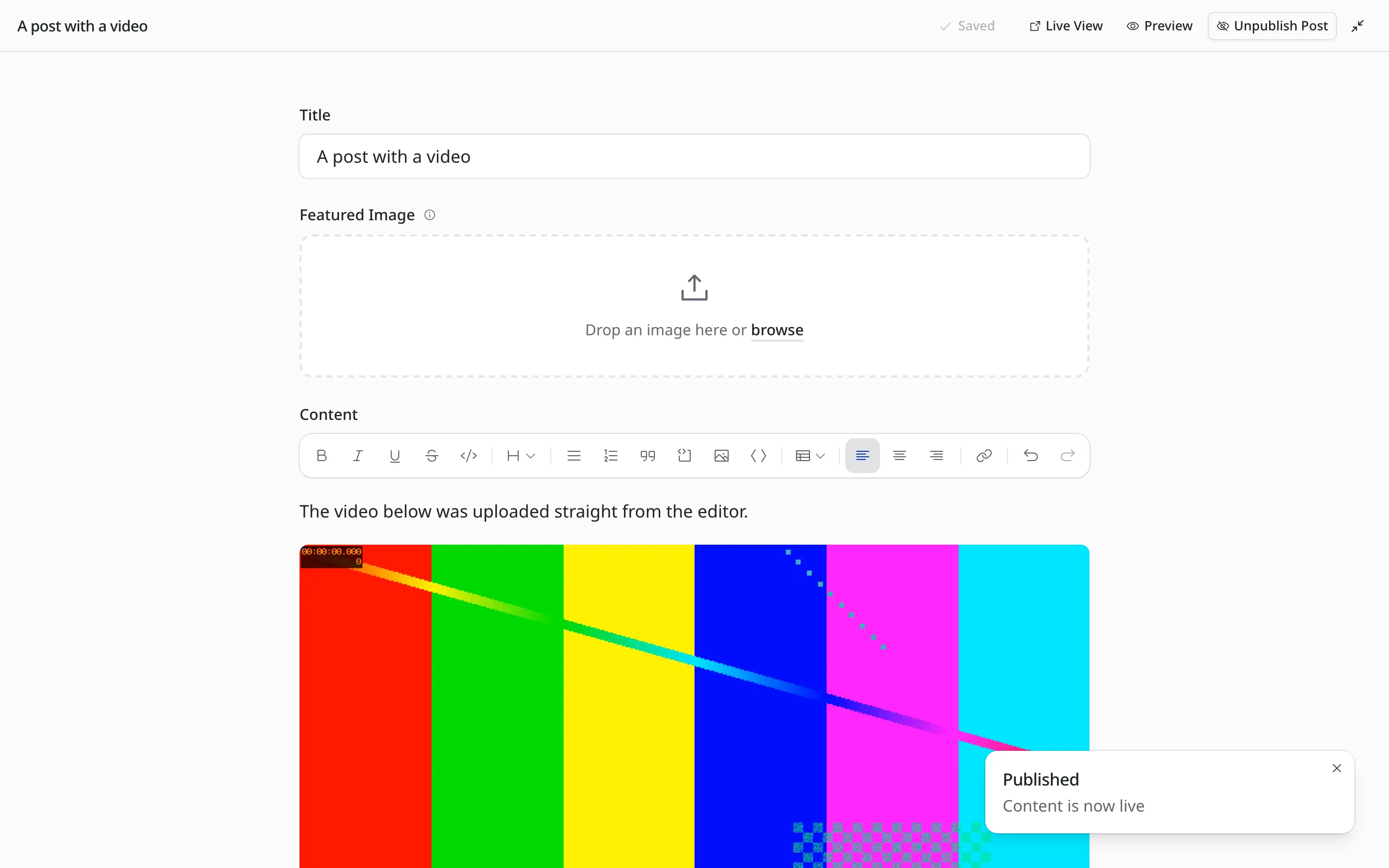
Distraction-free mode with the new bar.
If you write a lot, you'll notice the details:
- Slash menu:
/opens the blocks, grouped and with the matching Markdown shortcut next to each. Search understands abbreviations such as/blfor Bullet List and Markdown such as/#. - Handles on every block: Hover over a paragraph and a plus and a handle appear on the left. The plus adds a block below, the handle drags the block or opens a menu with Turn into, Align, Duplicate, Move and Delete.
- Keyboard: Enter in the title jumps into the text, Escape selects the current block, and the arrow keys then move from block to block. Select All first selects the current block and the whole document on the second press.
- Links: Clicking a link shows where it goes, with Edit and Remove. A bare domain such as
example.comgetshttps://automatically. - Narrow screens: On tablets and phones the bar shows icons only, so it fits on one row.
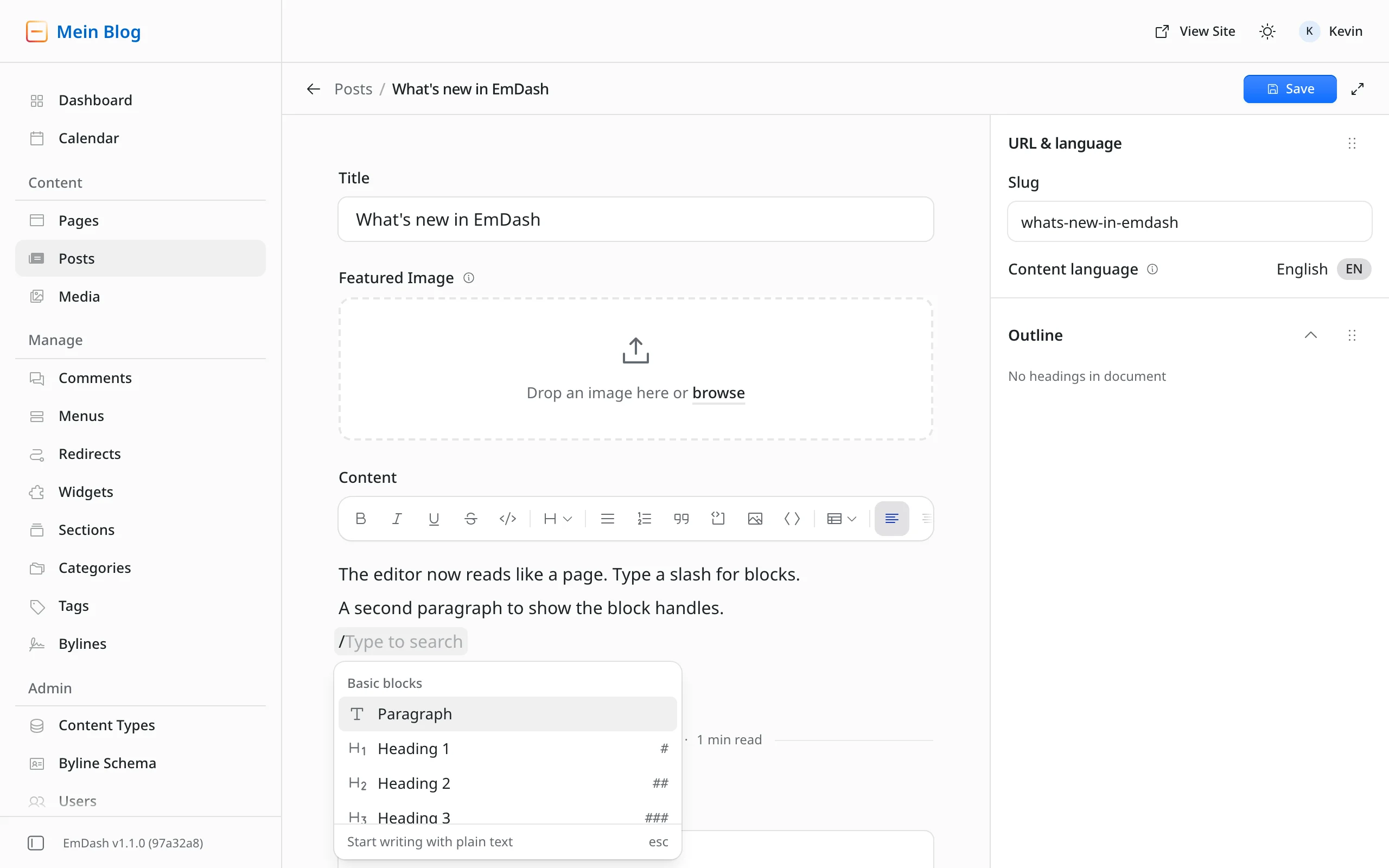
The slash menu shows the Markdown shortcut for every block.
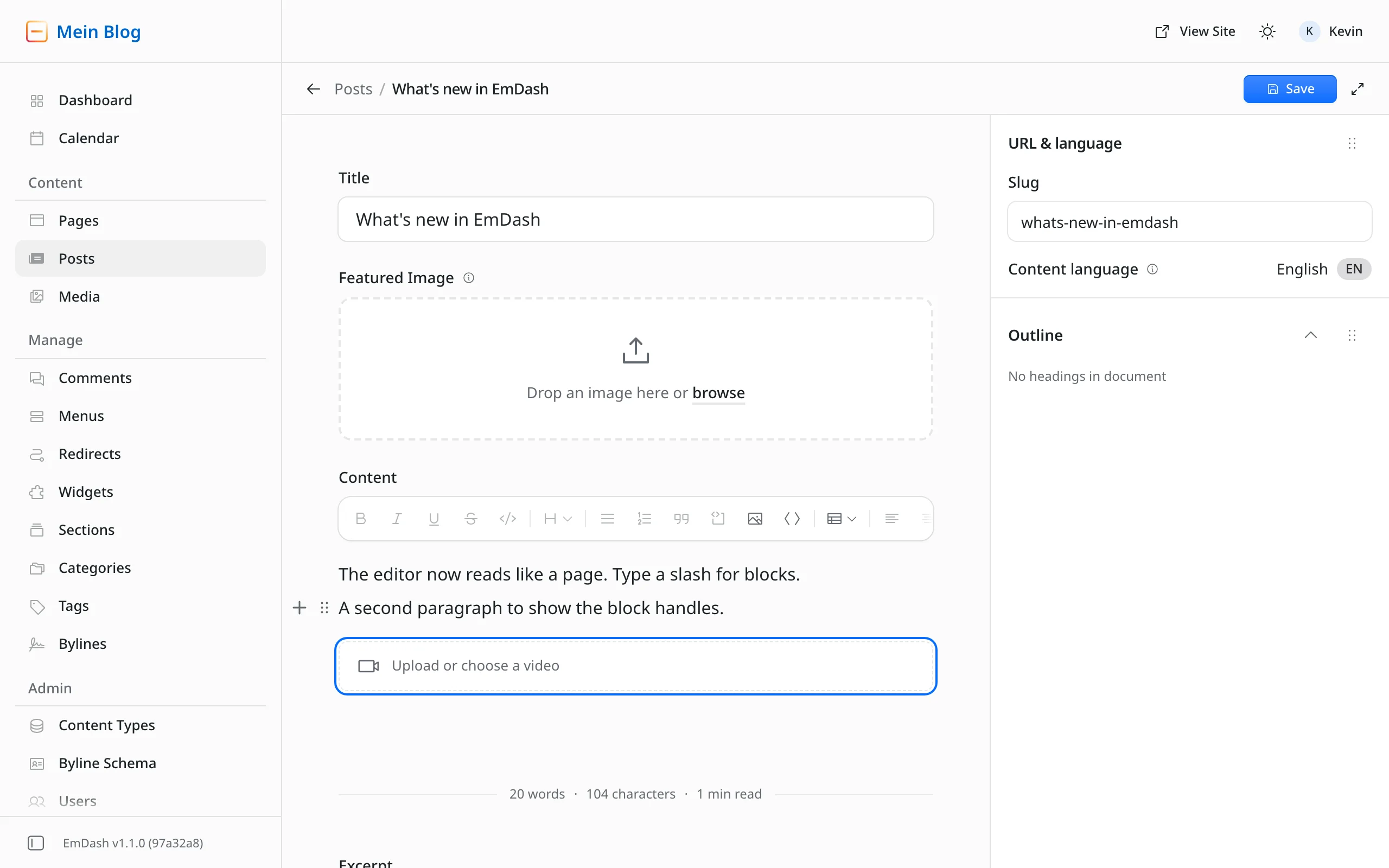
The plus and the handle appear as soon as the mouse is over a block. Below, an empty video block.
Smaller fixes around the editor:
- New entries start with each field's default value. Until now, a toggle with
defaultValue: truestarted switched off anyway (#3758). - An entry that fails to load shows an error page instead of a blank screen (#3878).
- The field editor stays open and shows the error when the server rejects a change (#3701).
- "Pending changes" only shows in the list for entries that have been published before (#3010).
The video block: video right in the text
Until now, a video in the text needed a plugin or an HTML block. Now there's a dedicated video block (#3827). /video opens the Media Library, where you pick a video or upload one. Video files you drag or paste into the text also go to the Media Library and appear where you dropped them.
I uploaded a four-second test video and published the post. On the site it shows up with the browser's own player, with no change to the blog template.
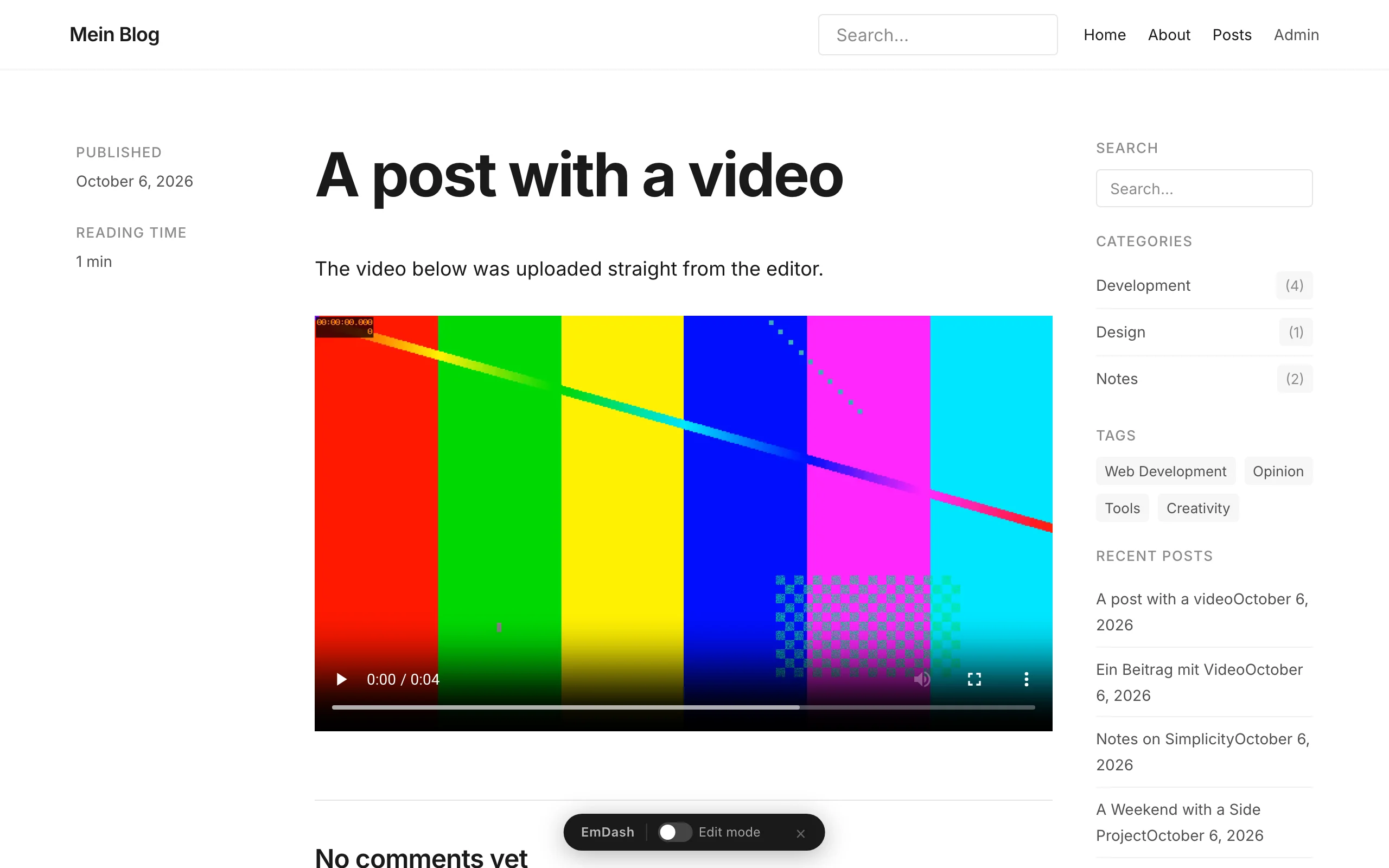
The test video on the site. The template needs no change for it.
Two fixes to how media is served go with it. Videos from the Media Library now play in Safari and on iPhones and can be scrubbed, because EmDash answers range requests (#3828). And images and files send ETag and Last-Modified, so on a repeat visit the browser only checks briefly instead of downloading everything again (#3855).
Uploads are limited to 50 MiB by default. For longer videos, a video service or a plugin is still the better choice.
Numbered pages in lists
Every list in the admin now has numbered pages, like the Media Library (#3773). At the bottom you get the range, a choice of 20, 50 or 100 entries per page and the page controls. A collection loads 20 entries when it opens instead of 100, and the Trash counts every entry instead of stopping at 50. A selection stays in place as you page through.
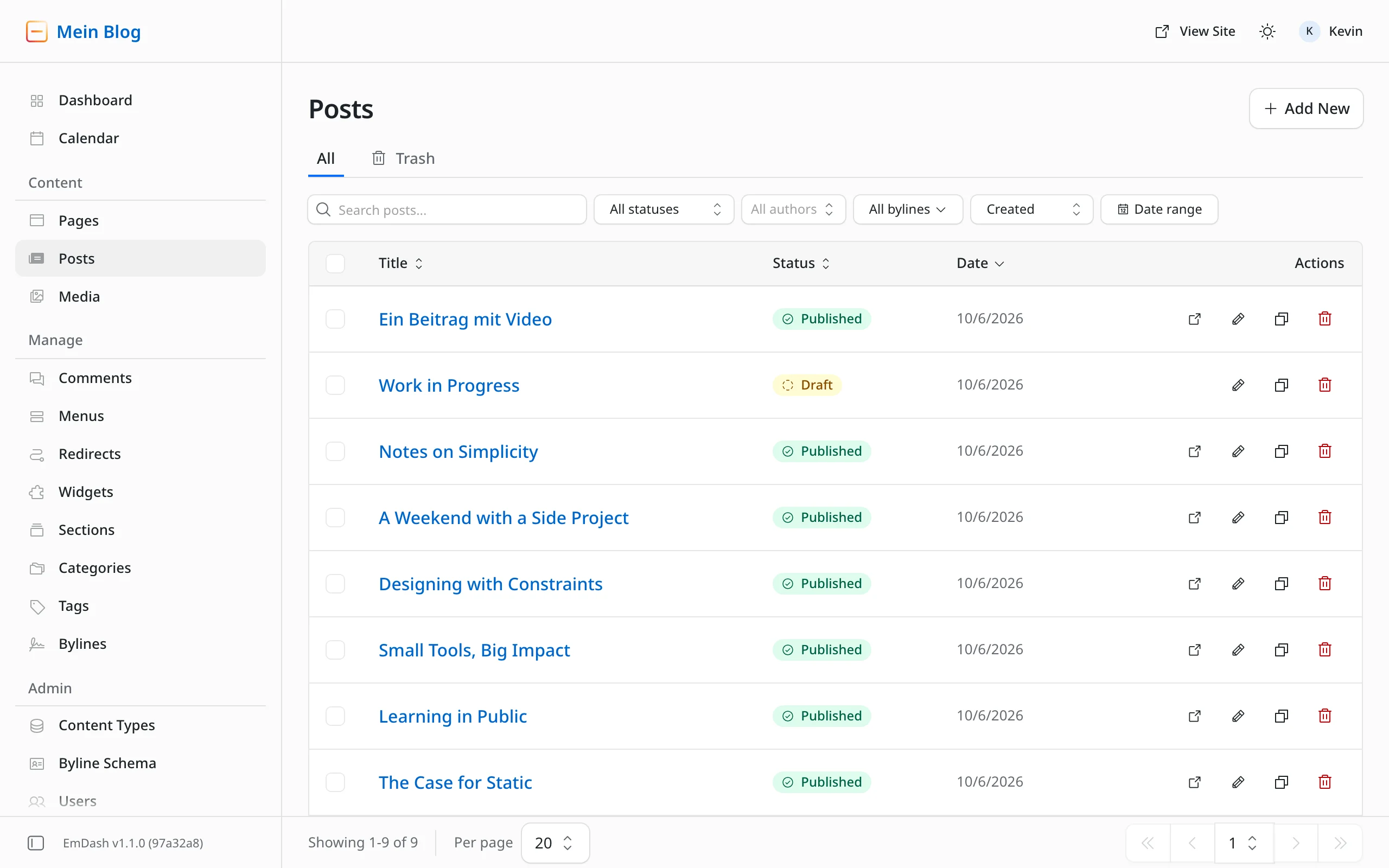
The new list footer. Large collections open noticeably faster.
Changing domains without passkey chaos
Moving an EmDash site to a new domain used to be tricky, because passkeys are tied to the address they were created on. EmDash 1.2 adds a dedicated flow for it (#3744):
- Change domain: Under Settings → General, a dialog checks that the new domain really serves the site and only then switches. After that, emails, plugins, sitemaps,
robots.txt, hreflang, canonical links and social images use the new address. - Email users: One action sends every other user an email with a button to the sign-in page at the new address. The site needs a plugin that sends email for this.
- Continue on: Anyone still signed in at the old address moves to the new one with "Continue on", without an email. The link is valid for five minutes and opens the page where you add a passkey for the new address. With Cloudflare Access the button doesn't appear, because Access handles sign-in.
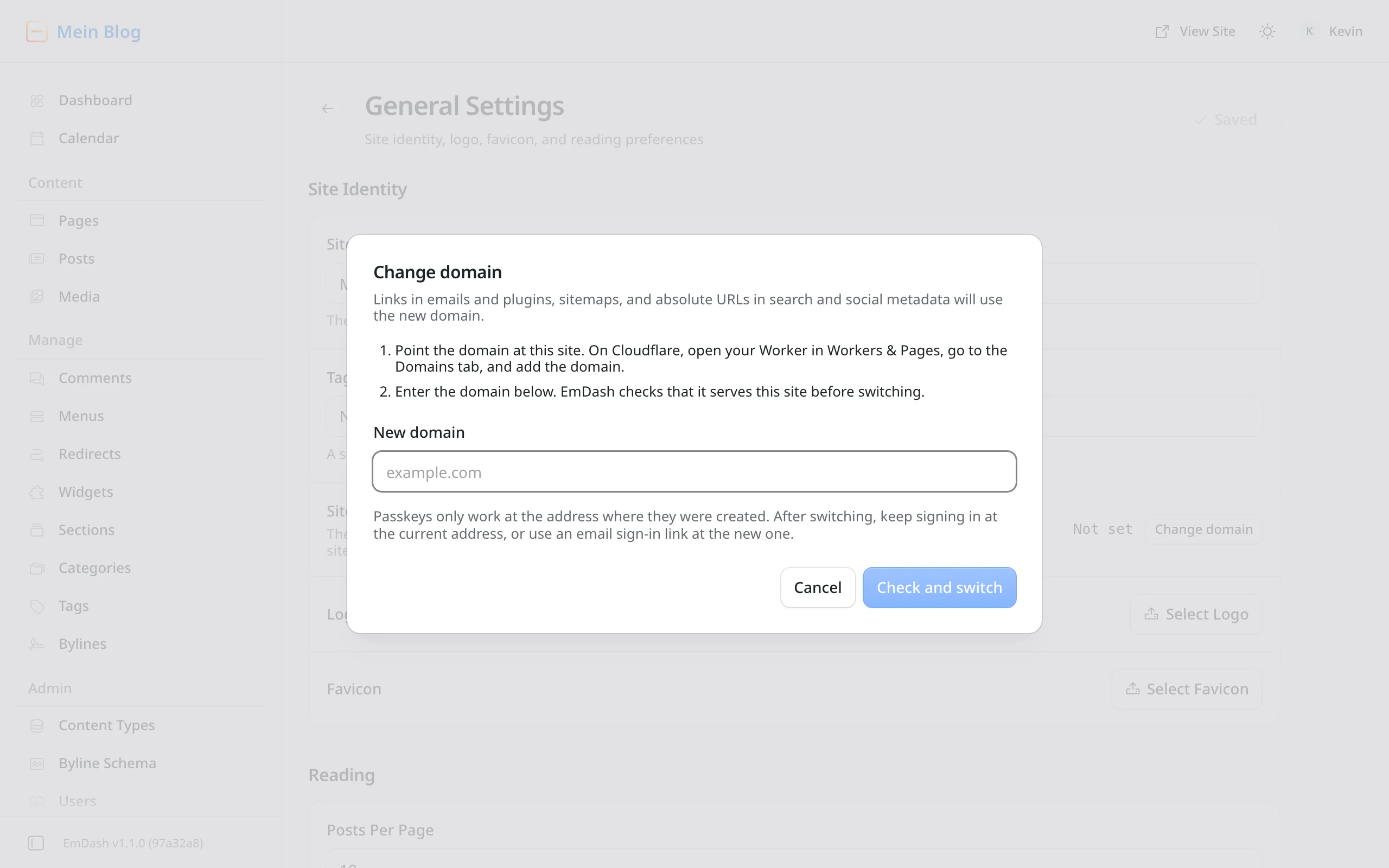
The new dialog explains the steps and warns about the passkey problem.
The Site URL field can no longer be edited directly. If siteUrl is set in the config, the page shows that address, and it still takes precedence.
A security fix that's worth the update on its own
EmDash adds an editor toolbar to the site for signed-in editors. It was inserted before the first </body> in the HTML. Because Astro doesn't escape < and > in attributes, an alt text containing </body> could move the toolbar into an attribute and turn the rest into live HTML (#3681).
That meant an author's published content could run scripts for any signed-in author, editor or admin who viewed the page. With toolbar: "client" it hit every visitor. The toolbar now only goes before the closing body tag of a whole HTML document. If several people have write access to your site, don't leave this update lying around.
A second fix belongs in the same corner. With a cache such as cacheCloudflare(), a page rendered for a signed-in user could end up in the cache and be served to anonymous visitors, for example a comment form with their name and email (#3898). The cache no longer stores such responses.
Better on Cloudflare
Many fixes target Cloudflare Workers, where EmDash runs most often. Nothing changes in your config; the site just gets leaner and more reliable.
Less load on the free plan. The cron job that runs every minute now only cleans up once an hour. On cold isolates it used to exceed the free plan's 10 milliseconds of CPU time (#3861). Cleaning up the 404 log no longer reads the whole table on every run (#3753).
Faster first requests. The database check now runs alongside startup on a new isolate instead of before it (#3573). Widget areas load with one query instead of several (#3575).
Writes that no longer get lost. A Worker may keep working after the response, but only if the work is registered with waitUntil. Otherwise Cloudflare cancels it. That's exactly what happened in several places:
- Hooks for new comments. A plugin that emails admins about new comments sent nothing because of it (#3631).
- Redirect hit counters and entries in the 404 log (#3287).
- "Last used" on API tokens and the cleanup of expired sign-in data (#3767).
On this site we worked around the comment hooks with a plugin of our own. With the update, that detour goes away.
D1 limits. D1 only allows a limited number of parameters per query. Assigning more than about 30 categories or tags to an entry failed because of it, including in the WordPress import (#3889), and plugins couldn't read or delete more than 98 entries at once (#3776). Both are fixed.
For sites: comments, images and sitemaps
- Comments in any language.
CommentsandCommentFormnow take labels and format dates in the page's language (#3697). I wrote this PR for our German edition, which used to show "No comments yet". After submitting, the form now also says whether the comment is published right away or waits for review. - Sharp small images. Avatars and icons get a double-size variant on high-density screens, and EmDash no longer requests sizes larger than the original (#3750).
- Sitemaps without a ceiling. A sitemap used to stop silently after 50,000 entries. Now each file holds up to 2,000 entries and continues in
-2.xml,-3.xmland so on (#3806). - Recent Posts widget. It now shows date and thumbnail (#3736) and can use
urlTemplateto link to posts that don't live under/posts/(#1899).
From WordPress to EmDash: a more thorough import
If you're moving from WordPress, several fixes help you. What the import still can't do with ACF fields, and how we solved it, is in our article on the ACF import. Whether the move is worth it for client projects at all is what our guide for agencies answers.
- After the import, media links outside image blocks also point to the imported files: cover backgrounds, file blocks, audio, video, links in text and tables, buttons and HTML blocks (#3896). Content imported before doesn't change.
- Scheduled posts arrive as scheduled instead of as drafts (#3895).
- Tables from the Classic editor become tables instead of a paragraph (#3762).
- Buttons keep their link (#3893).
- Posts with thousands of nested tags no longer crash the import (#3837, #3792).
- The media import stays under the CPU limit on Cloudflare because it sends smaller batches (#3751).
For plugin developers
- `plugin:install` and `plugin:activate` now also run for plugins from `astro.config.mjs` (#3785). They never ran there before, which kept cron jobs from
plugin:activatefrom working, for example. More on that below under what to check before updating. - Admin pages in groups: Plugin pages can join the sidebar's collapsible folders with
group(#3546). - Readable permissions: Every plugin capability now has a clear label (#3732). What these permissions mean for security is in our article on the plugin sandbox.
- The right address:
ctx.site.urlnow knows the configured address, not just the one the site was set up on (#3744). - Feedback on actions: Plugin pages and widgets show a loading state while an action runs (#3369).
Setup and admin languages
The site title from the setup wizard now sticks (#3749). I described the bug in our getting started guide, and Daniel fixed it. My freshly set up test site was then called "Mein Blog" as entered, instead of "My Blog". Sites that are already set up keep their title; you change it under Settings → General as before.
The admin speaks more languages: Hebrew with right-to-left layout (#3293) and European Portuguese (#3796) are new, and Thai, Korean, German, Danish, Spanish, Catalan, Serbian, Indonesian and Traditional Chinese are more complete. If you only need one or two languages, admin.locales limits the admin to them and makes its build smaller (#3056):
emdash({
	admin: { locales: ["en", "de"] },
});
Updating to EmDash 1.2: what to check first
Most changes need nothing from you. Nine things are worth a look before you update:
- Plugins in `astro.config.mjs`: On the first start after the update,
plugin:installandplugin:activaterun for each of these plugins that you've never enabled, disabled or changed MCP access for in the admin. An install hook that isn't safe to run on a site with existing data will run then. If a hook throws, EmDash disables the plugin. - Site URL: Email links now use the Site URL from the settings when
siteUrlisn't set. If an old domain is still in there, the links point to it after the update. - Sitemaps: If you submitted a single collection sitemap directly to Search Console and the collection has more than 2,000 entries, submit
/sitemap.xmlinstead. Custom sitemap routes need to know about the new follow-up pages. - Cloudflare Access: Names from the identity provider still overwrite names in the admin, but the field now shows as read-only. With
syncName: false, names edited in the admin are kept (#3875, #3877). - Custom video blocks: If a plugin already defines a block called
video, the editor keeps that one and doesn't offer the new block. If you edit Portable Text with your own TipTap schema, you need avideoBlocknode. - Links on multilingual sites: For entries in a prefixed locale,
entry.idnow always carries the prefix, for exampleen/my-post. On Cloudflare it was sometimes missing until now, and only in production, not inastro dev(#3922). If your site builds links fromentry.id, useentry.data.sluginstead. - Comment dates:
Commentsnow formats dates in the page's language instead of always in the US format. To keep the old format, passlocale="en-US"(#3697). - Seeds without content:
emdash seed --no-contentnow skips content, bylines and terms as documented. The--noContentspelling, the only one that worked until now, is no longer recognised. Update your scripts accordingly (#3525). - Images behind a proxy: If you set the public address with
EMDASH_SITE_URLorSITE_URL, EmDash now optimises locally stored images too. The variable has to be set whenastro buildruns; setting it only at runtime isn't enough (#3781).
How to update to EmDash 1.2
There's no update button in the admin. An update is a deployment: you bump the packages in your project and put the site online again. Your content stays in the database.
There's now a command for this, upgrade-emdash (#3804). Run it in the project folder, then put the site online as usual:
npx upgrade-emdash@latest
npm run deploy
The command finds every EmDash package in the project, meaning emdash and everything starting with @emdash-cms/, and bumps them together. It then installs with your package manager and writes the file .emdash/UPGRADE.md. It lists every changelog entry between your version and the new one and whether a migration comes along, meant as a work order for you or an AI agent. If a step fails along the way, it restores the files it changed. It doesn't change code, run migrations or deploy. With --dry-run it only shows the plan: on this site, the dry run reported two packages going from 1.1.0 to 1.2.0 and 67 changelog entries after 7 seconds, without touching a file.
You can still do it by hand. For a site from the Cloudflare template, that's two commands:
npm install emdash@latest @emdash-cms/cloudflare@latest
npm run deploy
In my test with the blog template, the update from 1.1.0 to 1.2.0 went without surprises: npm install took 26 seconds, no new migration came along, the database stayed at 90, and all eight posts were still there afterwards.
If you use other packages starting with @emdash-cms/, such as plugins, bump them in the same step. Test the update locally with npm run dev or on a preview before you take it live. How to note a restore point first, what happens to the database on the first request and how to get back if something breaks is in my step-by-step guide on how to update EmDash. How the project is structured and what deploy does is in our getting started guide.
What about you?
Have you updated to EmDash 1.2 yet? Which change helps you most day to day, and where does it still get stuck? Tell us in the comments. Daniel and I are both EmDash maintainers and read along: what you report here, we take straight into the project.
Changes to this article
- : Added the new upgrade-emdash command and three more things to check before updating.

Comments
No comments yet
First-time comments appear once we've approved them. How we handle your details